Release Version 0.86
- Shanmugam Radhakrishnan (Deactivated)
- Teresa Gracias
Purpose and Benefits
Canned and Custom Reports have their limitations. An implementer needs to know the OpenMRS data model and Custom SQL to extract the data for custom reports. In response to customer requests, developers have to repeatedly create canned reports and duplicate the SQL from a similar report, thus increasing the maintenance. This makes them complex and cumbersome.
To solve this, Bahmni has introduced generic reports for various entities in OpenMRS, for example: Observations, Visits and Programs etc. Generic reports allow an implementer to extract data from the system for each entity, hence Bahmni has a report for each. Generic reports provide options to include related fields and to apply various filters.
Types of Generic Reports
1. Visits Report
This feature allows the implementer to configure a customer-specific way to extract visit information. Using this report, filter(s) can be applied and a specific set of fields can be configured to appear in the output.
The following fields appear by default in the output.
Patient Identifier
Patient Name (First Name + Last Name)
Age
- Birthdate
- Gender
- Patient Created Date
- Visit type
- Date started
- Date stopped
- Date Of Admission
- Date Of Discharge
- New patient visit (When patient created and visit started same day then that visit considered)
| Key | Description | Required | Default |
|---|---|---|---|
| nameOfReport | Unique key to identify the report | Yes | |
| name | Report name to be shown on report | Yes | |
| type | Type of report | Yes | It has to be "visits" |
| config | The section to configure what is needed in the report | No | |
| forDataAnalysis | Fetches the patient_id and visit_id in the report | No | False |
| patientAttributes | Fetches patient attributes along with the mandatory fields | No | |
| visitAttributes | Fetches visit attributes along with the mandatory fields | No | |
| patientAddresses | Fetches patient address along with the mandatory fields | No | |
| applyDateRangeFor | Configures the field which we have to apply the date range for (visitStopDate | visitStartDate | dateOfAdmission | dateOfDischarge) | No | visitStartDate |
| visitTypesToFilter | Filters the visits by its type | No | All visit types |
| excludeColumns | Excludes the columns from output. | No | Includes all columns. |
additionalPatientIdentifiers | Displays additional identifiers in the report | No | No additional patient identifiers |
| ageGroupName | Name of the age group to show in report. Age group configurations can be inserted into the reference table "reporting_age_group" | No | No age group |
preferredColumns | Order of the columns to be displayed in the output report Need not mention all the columns in the config. Configured columns will be given precedence and shown first followed by all the other remaining columns in default order | No | Default order of the columns for the report. sample configuration "preferredColumns": ["Patient Name","Birth Date","Age"] |
| sortBy | To sort the reports output in ascending/descending order based on the configuration. Columns that are not present in the output of the report should not be configured. Default behaviour If just column is configured, not the sortOrder , then default sortOrder is ascending (asc). Allowed values for "sortOrder" For key "sortOrder", "asc" or "desc" are allowed values. Configured values are case insensitive. | No | Default output for the report. sample configuration "sortBy" : [{"column" : "BirthDate", "sortOrder" : "desc"}] |

Sample Report
2. Observations Report
This feature allows the implementer to configure a way to extract observation information. Using this report, filter(s) can be applied and a specific set of fields can be configured to appear in the output.
The following fields appear by default in the output.
Patient Identifier
Patient Name (First Name + Last Name)
Age
- Birthdate
Gender
Location Name
- Concept Name (If encounterPerRow is false)
- Observation Value (If encounterPerRow is false)
- Observation datetime (If encounterPerRow is false)
- Parent Concept (If encounterPerRow is false)
- Program Enrollment Date
- Program End Date
- Patient Created Date
Key | Possible Values | Description | Required | Default |
|---|---|---|---|---|
nameOfReport | Any string | Unique key to identify the report | Yes | |
name | Any String | Report name to be shown on report | Yes | |
type | Type of the report | Yes | "It has to be observations" | |
config | The section to configure what you need in the report | No | ||
patientAttributes | Any patient attribute types | Fetches patient attributes and mandatory fields | No | |
patientAddresses | Any patient address fields | Fetches patient address and mandatory fields | No | |
visitAttributes | Any visit attribute types | Fetches visit attributes and mandatory fields | No | |
showVisitInfo | true / false | Fetches visit information and mandatory fields. It fetches visit type, visit start date, visit stop date. | No | False |
showProvider | true / false | Fetches providers of individual observation. NOTE: Report doesn't show provider name if encounterPerRow is true. | No | False |
conceptNamesToFilter | Any FULLY_SPECIFIED concept name | Filters observation by any concepts/template/forms. It should be a FULLY_SPECIFIED concept name | Yes/No | All observations within date range if encounterPerRow is false No observations if encounterPerRow is true |
conceptValuesToFilter | Any value | Filters observation by any values like coded, range, text. (“underWeight”, “Normal”, “10..100”, “..100”). Format for numeric ranges : - "10..100": A range from 10 to 100 inclusive - "..100": Maximum value 100 inclusive - "10.." Minimum value of 10 inclusive | Yes/No | All observations within date range if encounterPerRow is false No observations if encounterPerRow is true |
conceptClassesToFilter | Any concept class | Filters observation by any concept classes like Drug, LabTest etc.. | Yes/No | Doesn't filter. Gives all observation of concepts configured of any class. |
locationTagsToFilter | Any location tag | Filters observations by locations. | No | All locations' data. |
applyDateRangeFor | visitStopDate / visitStartDate / programDate / obsCreatedDate / obsDate | Configures the field which we have to apply the date range for. | No | obsDate |
encounterPerRow | true / false | Fetches one encounter per row. ConceptName will be column and value will be row. If a concept is captured multiple times in an encounter it will appear comma separated. | No | False |
forDataAnalysis | true / false | Fetches database ids like patient_id, concept_id, observation_id etc. for purpose of analysis. | No | False |
programsToFilter | any program name | Filters observations by programs | No | |
visitTypesToFilter | any visit type | Filters the visits by its type | No | All visit types |
excludeColumns | any column names | Excludes the columns from output. | No | Doesn't exclude any columns. |
additionalPatientIdentifiers | Any additional patient identifier type | Displays additional identifiers in the report | No | Doesn't display additional patient identifiers |
ignoreEmptyValues | true / false | Ignores rows with no observation value. This config is not applicable when encounterPerRow is true | No | false |
conceptNameDisplayFormat | shortNamePreferred /fullySpecifiedName /fullySpecifiedName (shortName) | Displays the format of concept name on the report. shortNamePreferred displays the Concept Short Name if available, else the Fully Specified Name. Note: This option is currently only available for generic observation reports. | No | fullySpecifiedName(shortName) |
ageGroupName | Name of age group | Age group to be displayed in the report | No | Doesn't show age group |
| preferredColumns | List of column names | Order of the columns to be displayed in the output report Need not mention all the columns in the config. Configured columns will be given precedence and shown first followed by all the other remaining columns in default order | No | Default order of the columns for the report. sample configuration preferredColumns: ["Patient Name","Birth Date","Age"] |
sortBy | List of objects | To sort the reports output in ascending/descending order based on the configuration. Columns that are not present in the output of the report should not be configured. Default behaviour If just column is configured, not the sortOrder , then default sortOrder is ascending (asc). Allowed values for "sortOrder" For key "sortOrder", "asc" or "desc" are allowed values. Configured values are case insensitive. | No | Default output for the report. sample configuration "sortBy" : [{"column" : "BirthDate", "sortOrder" : "desc"}] |
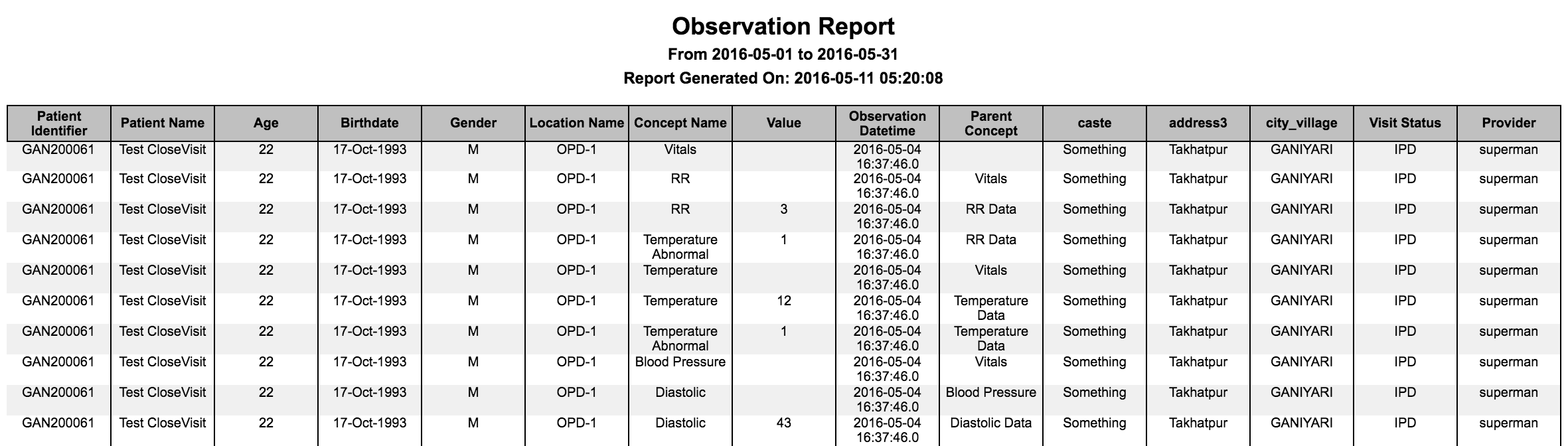
Report with one observation per row

Report with one encounter per row

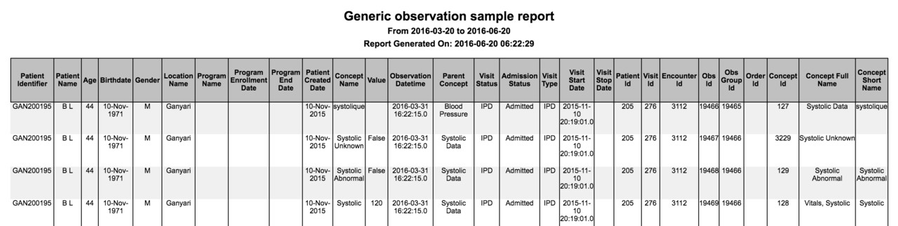
Report with all the default fields
3. Programs Report
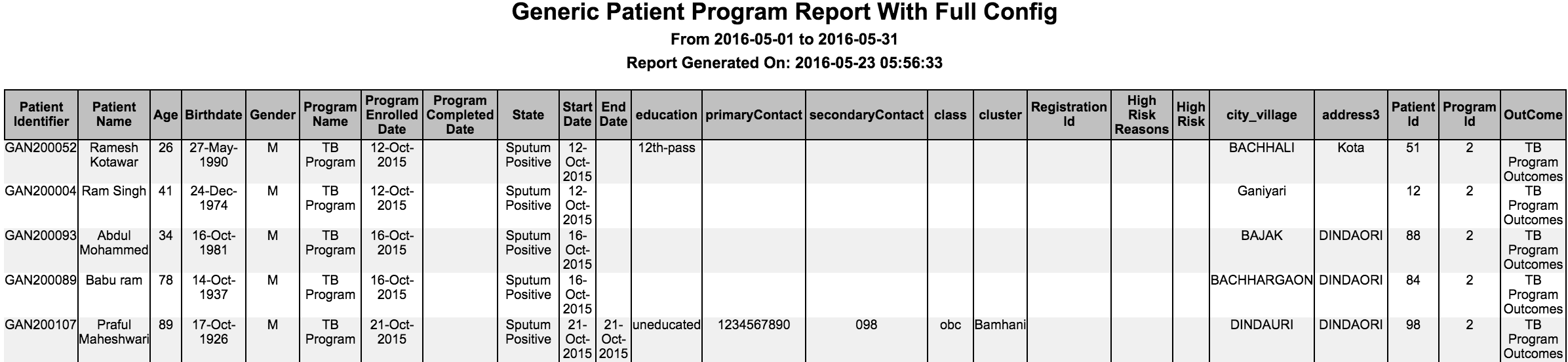
This feature allows the implementer to extract program information in a variety of ways. Using this report, filter(s) can be applied and a specific set of fields can be configured to appear in the output.
The following fields appear by default in the output.
Patient Identifier
Patient Name (First Name + Last Name)
Age
- Birthdate
Gender
- Patient Created Date
- Program Name
- Date Enrolled
- Date Completed
- Current State
Key | Possible Values | Description | Required | Default |
|---|---|---|---|---|
nameOfReport | Any string | Unique key to identify the report | Yes | |
name | Any String | Report name to be shown on report | Yes | |
type | "programs" | Type of the report | Yes | "It has to be programs" |
config | Configure what is required in the report | No | ||
patientAttributes | Patient Attribute Type | Fetches patient attributes and mandatory fields | No | None |
patientAddresses | Patient address fields | Fetches patient address and mandatory fields | No | None |
programAttributes | Program attribute type | Fetches program attributes and mandatory fields | No | None |
programNamesToFilter | Array of program names | Filters by programs | No | All programs |
forDataAnalysis | true / false | Fetches database ids like patient_id, program_id etc. for purpose of analysis. | No | False |
showAllStates | true / false | Shows all the states of the program | No | False |
excludeColumns | Any column | Excludes the columns from output. | No | Doesn't exclude any columns. |
additionalPatientIdentifiers | Any additional patient identifier type | Displays additional identifiers in the report | No | Doesn't display any additional patient identifier |
ageGroupName | Any age group name | Name of the age group to show in report | No | Doesn't show age group |
| preferredColumns | List of column names | Order of the columns to be displayed in the output report Need not mention all the columns in the config. Configured columns will be given precedence and shown first followed by all the other remaining columns in default order | No | Default order of the columns for the report. sample configuration preferredColumns: ["Patient Name","Birth Date","Age"] |
| sortBy | List of objects | To sort the reports output in ascending/descending order based on the configuration. Columns that are not present in the output of the report should not be configured. Default behaviour If just column is configured, not the sortOrder , then default sortOrder is ascending (asc). Allowed values for "sortOrder" For key "sortOrder", "asc" or "desc" are allowed values. Configured values are case insensitive. | No | Default output for the report. sample configuration "sortBy" : [{"column" : "BirthDate", "sortOrder" : "desc"}] |
4. Aggregation on generic reports
There are entity-based generic reports, for example, the observations report which extracts data from observations into excel where further macros can be applied. However this report gives the flexibility of providing pivot information in the configuration itself, instead of writing macros that will produce the required output.
| Key | Possible Values | Description | Required | Default |
|---|---|---|---|---|
| nameOfReport | Any string | Unique key to identify the report | Yes | |
| name | Any String | Report name to be shown on report | Yes | |
| type | "aggregation" | Type of the report | Yes | "It has to be aggregation" |
| config | Is the section to configure what you need in the report | Yes | ||
| report | Any existing generic reports (Ex: observations) | Is to apply aggregation on that particular report. The config under report option refers to generic report config. If it is observations then config values from observations report will be used here. | Yes | None |
| rowGroups | Any column name in the report on which we are doing aggregation | Includes columns to group for rows | Yes | None |
| columnGroups | Any column name in the report on which we are doing aggregation | Includes columns to group for columns | No | None |
distinctGroups | Any column name in the report on which we are doing aggregation | Performs a distinct count on given column after grouping rows and columns | Yes | None |
| showTotalRow | true / false | Shows the Total row at the bottom of table | No | false |
| showTotalColumn | true / false | Show the Total Column as last column of table | No | false |
To generate aggregation for the above observations, use the sample config to produce the following output. This reports shows the number of males and females based on their diastolic and systolic values as we defined rowGroups as Gender and columnGroups as Concept Name and Value. The count is based on Patient Identifier which is specified in the distinct Group.

5. Concatenating Multiple Reports
This feature concatenates multiple reports. Concatenated reports do not support CSV format.
| Key | Possible Values | Description | Required | Default |
|---|---|---|---|---|
| nameOfReport | Any string | Unique key to identify the report | Yes | |
| name | Any String | Report name to be shown on the concatenated report | Yes | |
| type | "concatenated" | Type of the report | Yes | "It has to be concatenated" |
| config | Config for all the reports that you want in one report file. Please refer to the individual report description above for configuring them | Yes |
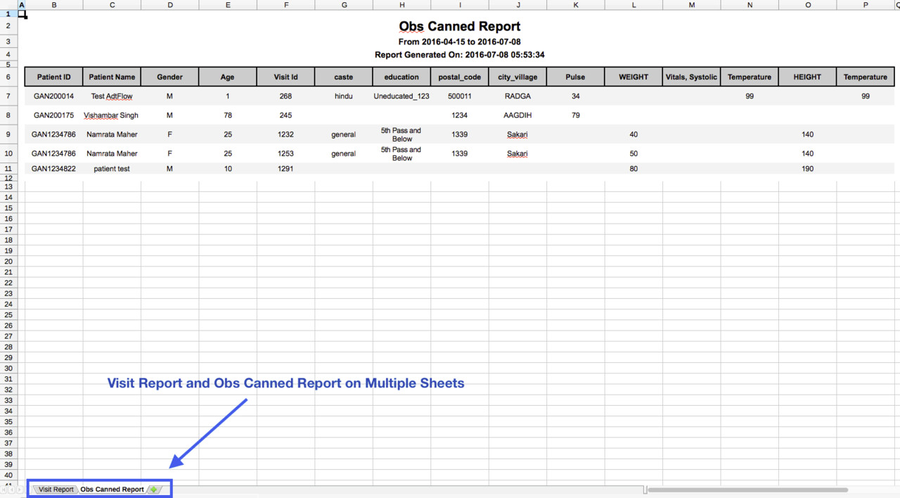
Example: A concatenated report of Visit Report and Obs Canned Report, will display each report on a different sheet in Excel. For other formats like PDF, HTML, etc., reports will be one below the other.
6. Lab Results Report
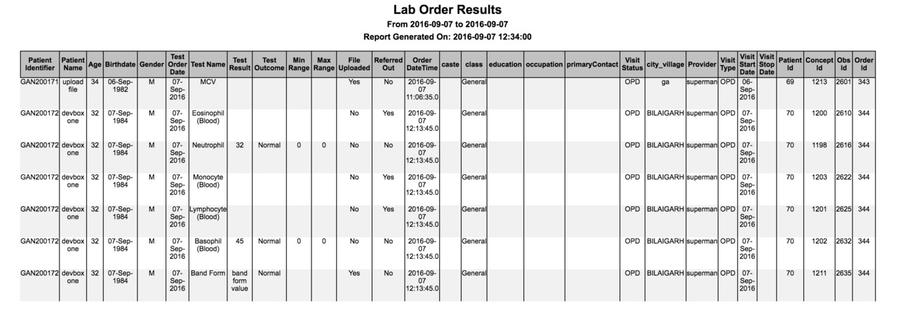
This feature allows the implementer to configure lab results information in a variety of ways. Using this report, filter(s) can be applied and a specific set of fields can be configured to appear in the output.
The following fields appear by default in the output:
Patient Identifier
Patient Name (First Name + Last Name)
Age
- Birthdate
Gender
- Test Order Date
- Test Name
- Test Result
- Test Outcome
- Test Result Min range
- Test Result Max range
- Referred Out
- File Uploaded
| Key | Possible Values | Description | Required | Default |
|---|---|---|---|---|
| nameOfReport | Any string | Unique key to identify the report | Yes | |
| name | Any string | Report name to be shown on report | Yes | |
| type | Type of the report | Yes | "It has to be labOrders" | |
| config | Configure what is required in the report | No | ||
| patientAttributes | Patient attribute types | Fetches patient attributes and mandatory fields | No | |
| patientAddresses | Patient address fields | Fetches patient address and mandatory fields | No | |
| visitAttributes | Visit attribute type | Fetches visit attributes and mandatory fields | No | |
| showVisitInfo | true / false | Fetches visit information and mandatory fields. It fetches visit type, visit start date, visit stop date. | No | False |
| showProvider | true / false | Fetches provider of individual lab result. | No | False |
| conceptNamesToFilter | FULLY_SPECIFIED concept name of a lab test | Filters lab results by any test name. The name you specify should be a FULLY_SPECIFIED concept name. | No | All lab results within specified date range |
| conceptValuesToFilter | Any test result value or numeric ranges | Fetches lab results by any test result value or numeric ranges. Format for numeric ranges: - "10..100": A range from 10 to 100 inclusive - "..100": Maximum value 100 inclusive - "10.." Minimum value of 10 inclusive | No | |
forDataAnalysis | true / false | Fetches database ids like patient_id, concept_id, observation_id etc. | No | False |
| programsToFilter | any program name | Filters lab results by programs | No | |
| excludeColumns | any column names in the report | Excludes the columns from output | No | Doesn't exclude any columns. |
showOrderDateTime | true / false | Shows order creation date time in the database | No | False |
additionalPatientIdentifiers | Additional patient identifier type | Displays additional identifiers in the report | No | No additional patient identifier |
| ageGroupName | Any age group name | Name of the age group to show in report | No | No age group |
| showReferredOutTests | true / false | Filters out referred out tests based on the value | No | true |
| preferredColumns | List of column names | Order of the columns to be displayed in the output report Need not mention all the columns in the config. Configured columns will be given precedence and shown first followed by all the other remaining columns in default order | No | Default order of the columns for the report. sample configuration preferredColumns: ["Patient Name","Birth Date","Age"] |
| sortBy | List of objects | To sort the reports output in ascending/descending order based on the configuration. Columns that are not present in the output of the report should not be configured. Default behaviour If just column is configured, not the sortOrder , then default sortOrder is ascending (asc). Allowed values for "sortOrder" For key "sortOrder", "asc" or "desc" are allowed values. Configured values are case insensitive. | No | Default output for the report. sample configuration "sortBy" : [{"column" : "BirthDate", "sortOrder" : "desc"}] |
The Bahmni documentation is licensed under Creative Commons Attribution-ShareAlike 4.0 International (CC BY-SA 4.0)