Release Version 0.84
Introduction
Bahmni has Reports app or module. The Report app is enabled based on privilege. You can access the Reports app from Home dashboard. Generally, Admin user will have the privilege for reports app. When the user enter into report app, the user will see a list of configured reports. The user can launch any of the report with Start & End date, output format.
Every Bahmni implementation has its own config module. So, an implementer has to configure the required reports properly so that reports app will show all the configured ones. The configuration file is located at openmrs/apps/reports directory of the config module.
Reports can be used in couple ways in Bahmni
- Standard Reports useful to management level people
Extract data from backend database to analyse various facts for different stockholders
Bahmni report module supports various output format
- HTML
- EXCEL
- Custom EXCEL (Excel with pre-defined macro)
- CSV
ODF (Openoffice format)
There are different ways reports defined in Bahmni
- Canned Reports
- Custom SQL
Jasper Reports
Generic reports (latest development in reports module)
Version Controlling Reports
The reports at an implementation site will be available in implementation specific config folder. These report.json and associated sql files in this folder are generally text based. They can be managed in standard version control systems like github. Its a best practice to version control these files to maintain history and traceability across various releases of the product.
Sample Configuration
There is JSON file used for configuring reports. It is located at /var/www/bahmni_config/openmrs/apps/reports/reports.json.
"config": {
   "paperSize": "A3", //The default paper size is A4. Supported sizes are A3 and A4.
   "supportedFormats": ["pdf"], //List of available formats are html, pdf, excel, csv, custom excel, ods. When not defined, all the available formats will be listed.
}
Canned reports
These reports meant to give specific or predefined information from Bahmni. There are minimal configuration available for these reports. Whenever new requirement from Client, even though there is a similarity in the existing report, we cannot reuse it. Hence Bahmni system end up with new canned reports and its makes more maintenance. So, there is Generic Reports which will eventually hoping to solve the problem.
Reference tables
- Bahmni allows one to setup multiple type of age groups each with a name. Each report configuration can use their own age group by specifying their name in the configuration.
For example:
The report given below shows counts based on age-groups.

To display reports like this, you should insert age group configurations into the reference table "reporting_age_group" and then reference that from the report configuration.

Configuration
"nutritionProgram": {
    "name": "Nutrition Program - <5 years children receiving (Vitamin A)",
    "type": "obsCount",
    "config": {
    "ageGroupName": "Nutrition Program Vitamin A",
"conceptNames": ["Childhood Illness, Vitamin A Capsules Provided"]
}
}
You can insert entries into reporting_age_group using SQL commands. Given below a set of example INSERT SQL commands.
INSERT INTO reporting_age_group (name,report_group_name, min_years, min_days, max_years, max_days)
VALUES ('6 - 11 months', 'Nutrition Program Vitamin A',0,180,1,-1);
INSERT INTO reporting_age_group (name,report_group_name, min_years, min_days, max_years, max_days)
VALUES ('12 - 59 months', 'Nutrition Program Vitamin A',1,0,5,-1);
- For certain reports one can also set some reference range for concepts.
1. Obs Count Report
There are three variants of this.
N.B:- If you are giving more than one concept name in the config, please make sure that all of them are of same data type, (Either coded concept or boolean concept). If a mix of datatypes are provided, it will always generate obs count report.
1.1 Obs count
Use this, if you just want to count the number of observations created for a concept (other than Boolean or Coded).
Example
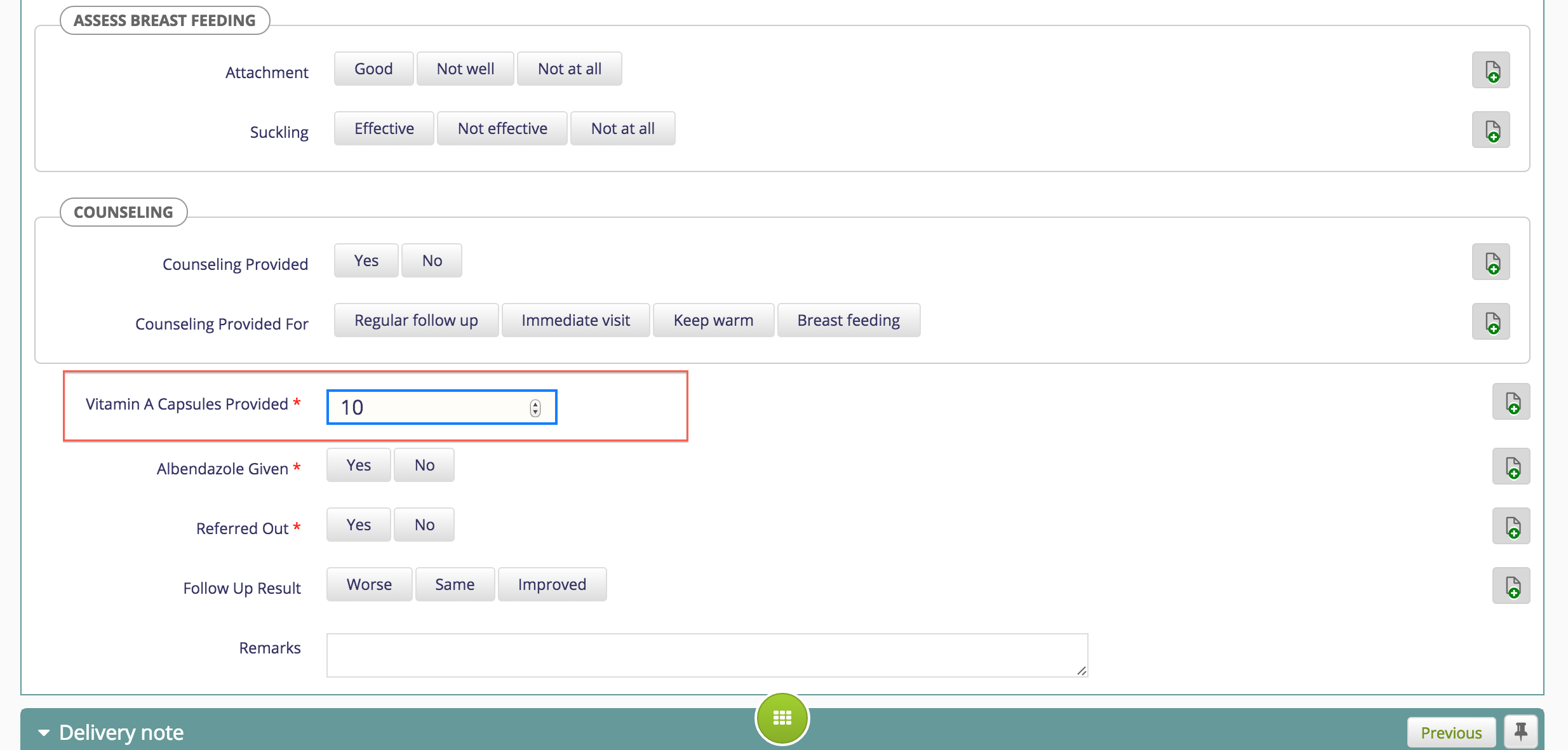
Configuration
"nutritionProgram": {"name": "Nutrition Program - <5 years children receiving (Vitamin A)",
"type": "obsCount",
"config": {
"ageGroupName": "Nutrition Program Vitamin A",
"conceptNames": ["Childhood Illness, Vitamin A Capsules Provided"],
"locationTagNames": ["Report Location"],
      "countOnlyClosedVisits":"false"
    }
}
- Add the location Tag “Report location” in openmrs
- And specify the location tag in config ex. "locationTagNames": ["Report Location” ],
1.2. Coded Obs count Boolean
To count the number of observations of a coded concept, classified by the user selection (coded answers).
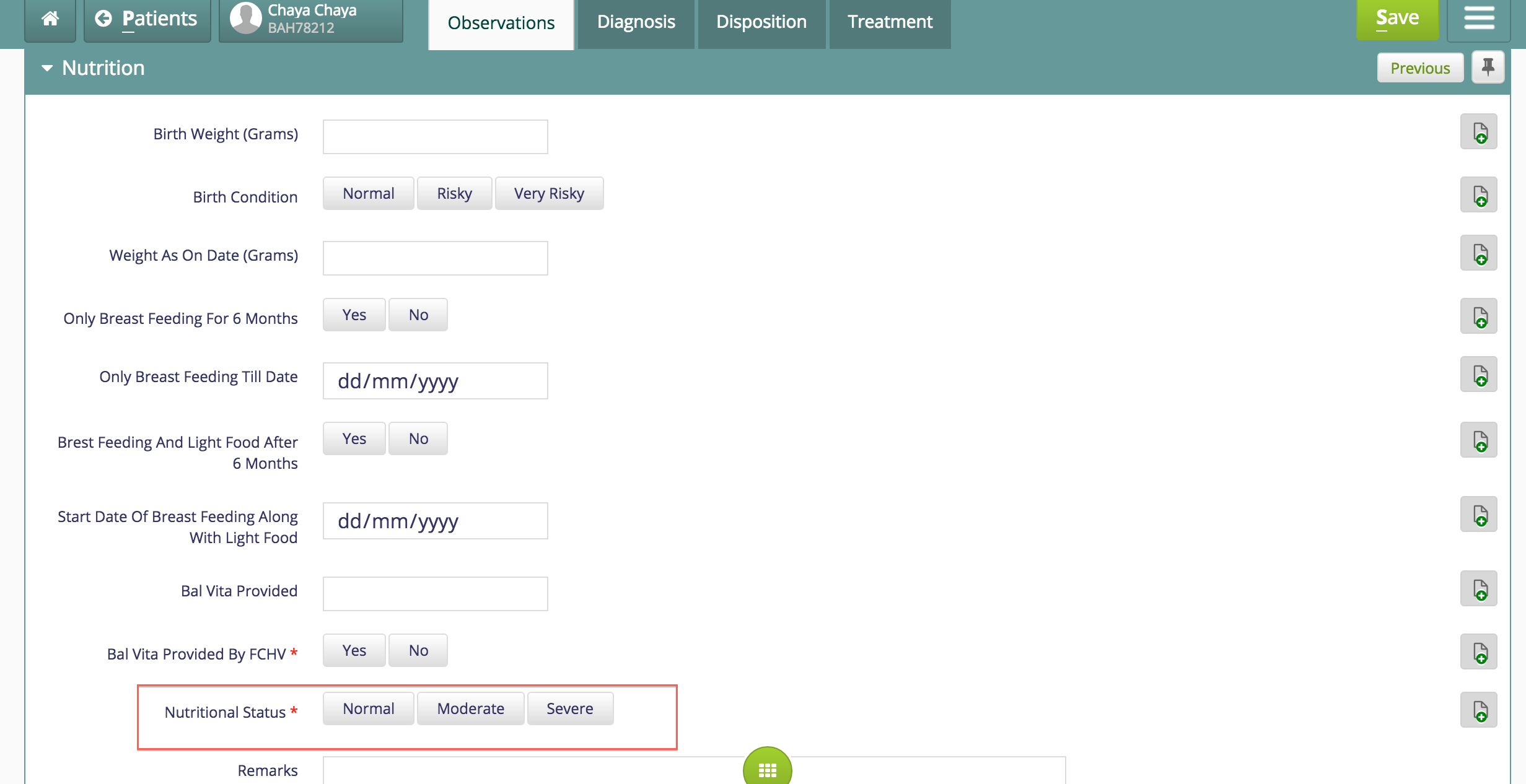
Configuration
"nutritionProgram": {"name": "Nutrition Program - Nutritional status of registered children"
,
"type":
 "obsCount",
    "config": {
      "ageGroupName": "Nutritional Status For Registered Children",
      "conceptNames": ["Nutrition, Nutritional Status"],
      "locationTagNames": ["Report Location"]
}
}
- Add the locationTag “Report location” in openmrs
- And specify the location tag in config ex. "locationTagNames": ["Report Location” ]

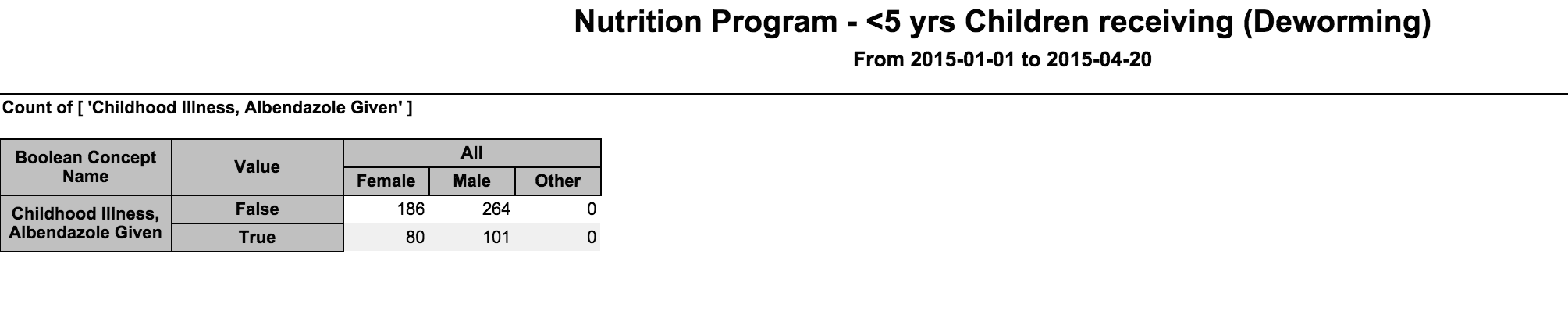
1.3 Boolean concepts count
(to be renamed toBoolean Observations Count) Use this when you want to count the observations of type boolean, classified by the user selection: Yes/No (True/False).
Example
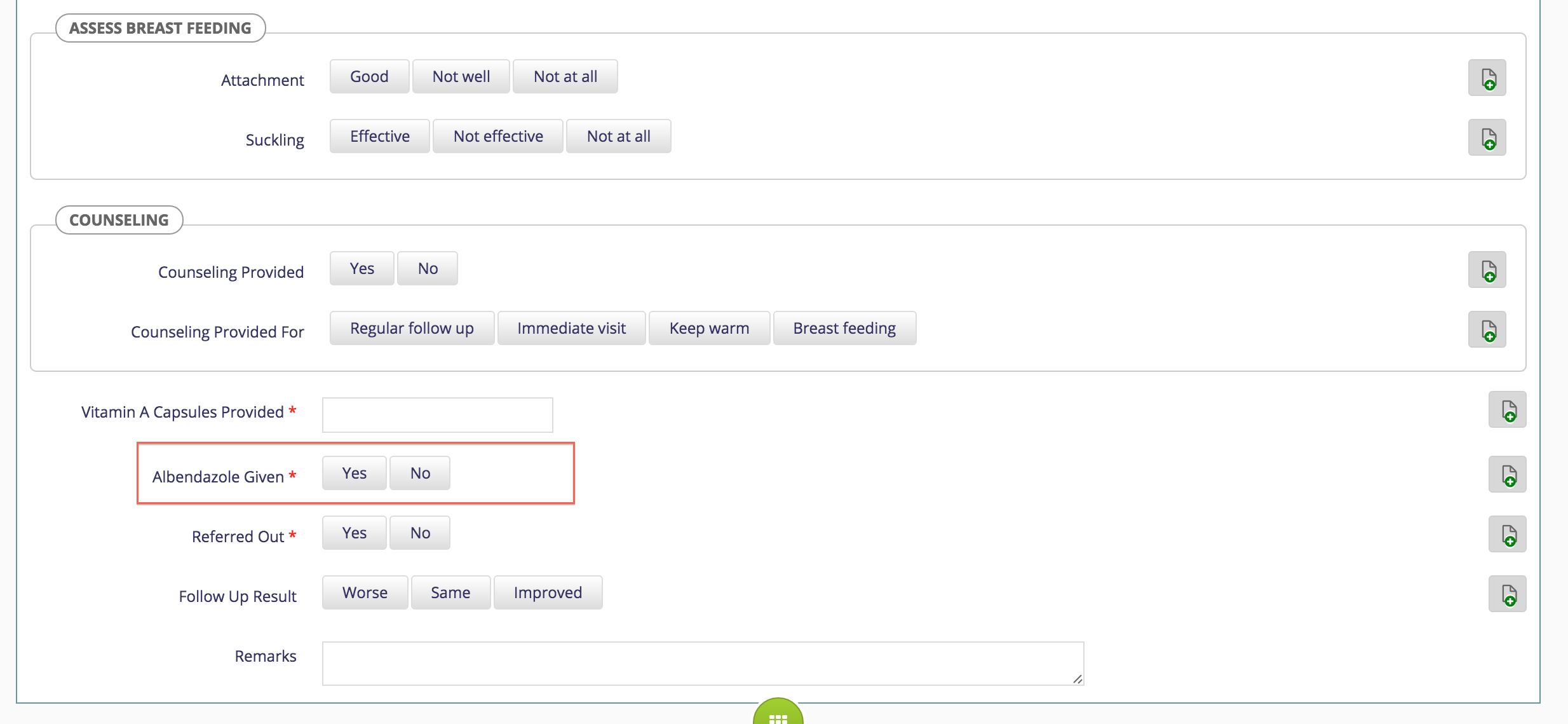
Configuration
"nutritionProgram": {"name": "Nutrition Program - <5 yrs Children receiving (Deworming)",
  "type": "obsCount",
  "config": {
    "ageGroupName": "All Ages",
    "conceptNames": ["Childhood Illness, Albendazole Given"]
  }
}
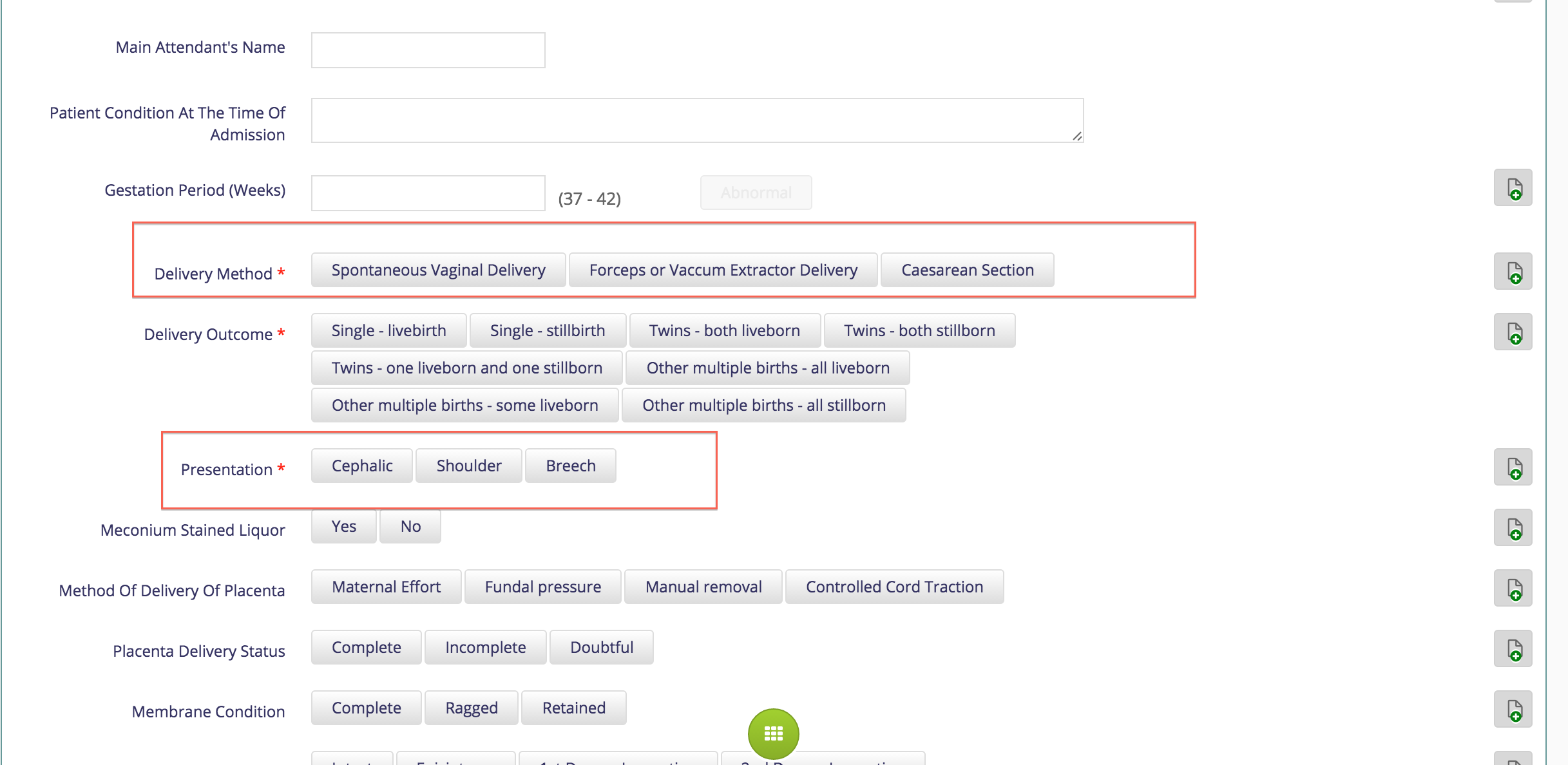
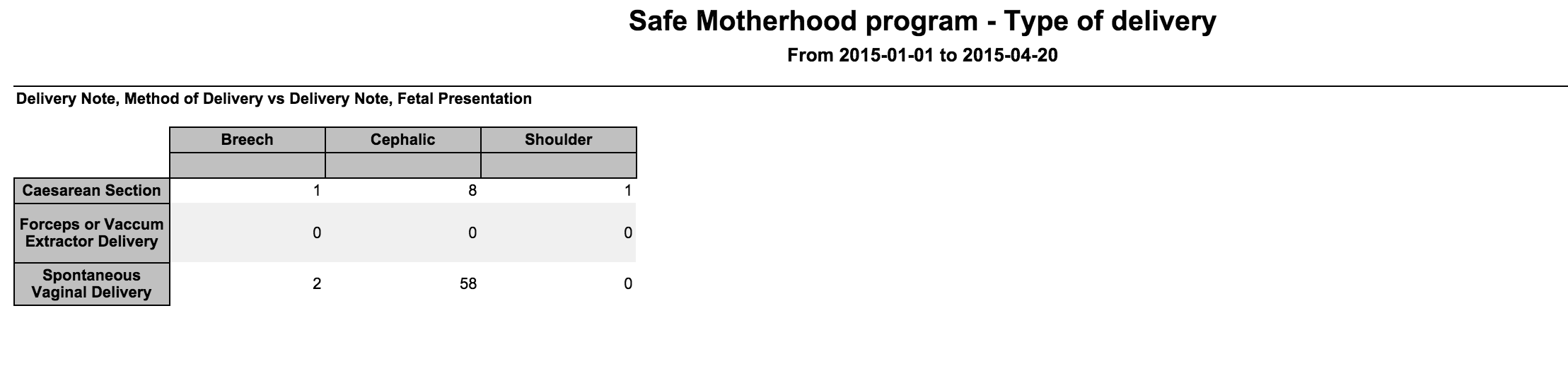
2. Coded Obs by Coded Obs (count)
Use this to count the two coded observations, both counted and displayed as a pivot table against each other.
Example
Configuration
"safeMotherhoodProgram": {"name": "Safe Motherhood program - Type of delivery",
"type": "CodedObsByCodedObs",
"config": {
"ageGroupName": "All Ages",
"conceptPair": ["Delivery Note, Method of Delivery", "Delivery Note, Fetal Presentation"],
"rowsGroupBy": ["Delivery Note, Method of Delivery"],
"columnsGroupBy": ["Delivery Note, Fetal Presentation"]
}
}
3. Diagnosis count
Lists count of all diagnosis entered via the Bahmni system.
Configuration
"nameOfReport": {"name": "Name of Report",
"type": "diagnosisCount", // Mandatory. Value should be exactly diagnosisCount
"config": {
"dateRangeRequired": false, // Optional. Used to display reports that do not require a date range in a different section. Default true
"applyDateRangeFor": "visitStopDate|diagnosisDate", // Optional. Default value = 'visitStopDate'. Valid only when dateRangeRequire=true
"visitsToConsider": "open|closed|all", // Optional field. Default value = 'all'
"ageGroupName": "age group name defined in reporting_age_group.report_group_name" //Optional
"concept": "concept_set_name", // Mandatory. Three level concept set structure, with a root_concept, header_concepts and leaf_concepts
"rowsGroupBy": ["gender|agegroup_name|header_concept_name|leaf_concept_name"], // Optional field but when rowsGroupBy is specified, columnsGroupBy should also be specified. Default value is ["header_concept_name", "leaf_concept_name]
"columnsGroupBy": ["gender|agegroup_name|header_concept_name|leaf_concept_name"], //Optional field but when rowsGroupBy is specified, columnsGroupBy should also be specified. Default value is ["agegroup_name"]
"icd10ConceptSource": "ICD10-BD", // Optional field. Default value = 'ICD 10 - WHO'. If any implementation is using a different concept source for diagnosis coding, it can be set here.
"locationTagNames":["Report Location"] // Optional field. If any location tag is provided, only the encounters associated with the locations with those tags are counted. If this parameter is not set, all the encounters would be counted.
}
}Currently, if there is a concept field specified, we do not have ICD10 code in the report. It is currently not clear if ICD10 codes are required to be setup for the diagnosis report to work. Once a decision is reached, all reports will follow the convention.
The age group is supposed to be present in the reporting_age_group table in openmrs database.
Example
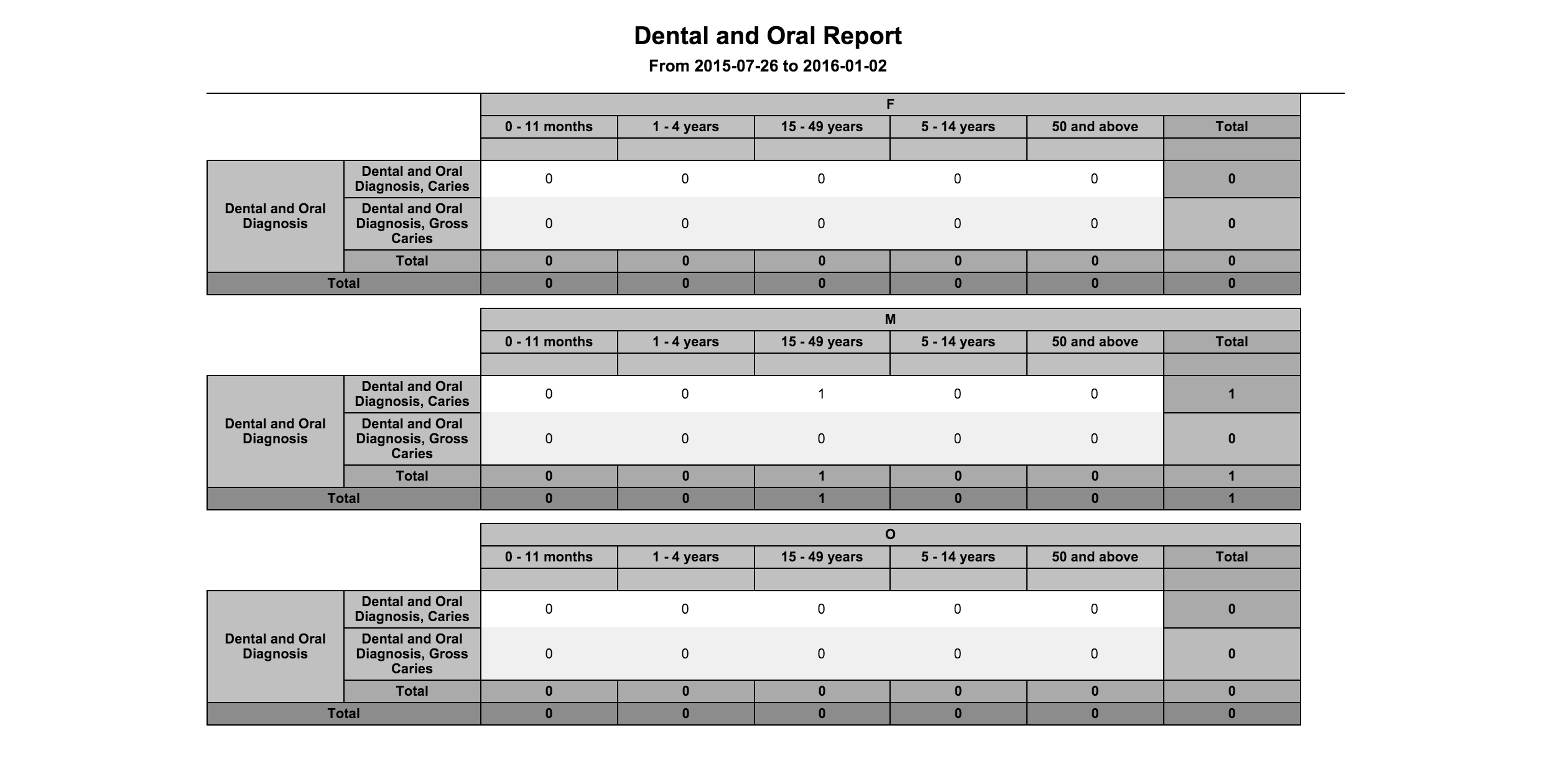
Diagnosis Summary report
"OralnDentalReport": {
          "name": "Dental and Oral Report",
          "type": "diagnosisCount",
          "config": {
             "concept": "Oral diagnosis",
             "ageGroupName": "Age Groups",
             "rowsGroupBy": ["header_concept_name","leaf_concept_name"],
             "columnsGroupBy": ["gender","agegroup_name"]
           }
 }
Diagnosis report without age group
"OralnDentalReport1": {
"name": "Dental and Oral Report 1",
"type": "diagnosisCount",
"config": {
"locationTagNames":["Report Location"],
"icd10ConceptSource":"ICD10-BD",
"rowsGroupBy": [
"header_concept_name",
"leaf_concept_name"
],
"visitTypes":["IPD","OPD"],
"columnsGroupBy": [
"gender",
"agegroup_name"
]
}
},

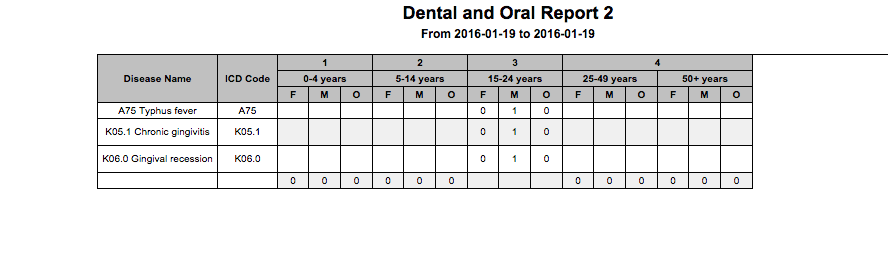
Diagnosis report with age group
"OralnDentalReport2": {
"name": "Dental and Oral Report 2",
"type": "diagnosisCount",
"config": {
"locationTagNames":["Report Location"],
"icd10ConceptSource":"ICD10-BD",
"ageGroupName": "Registration",
"rowsGroupBy": [
"header_concept_name",
"leaf_concept_name"
],
"visitTypes":["IPD","OPD"],
"columnsGroupBy": [
"gender",
"agegroup_name"
]
}
},
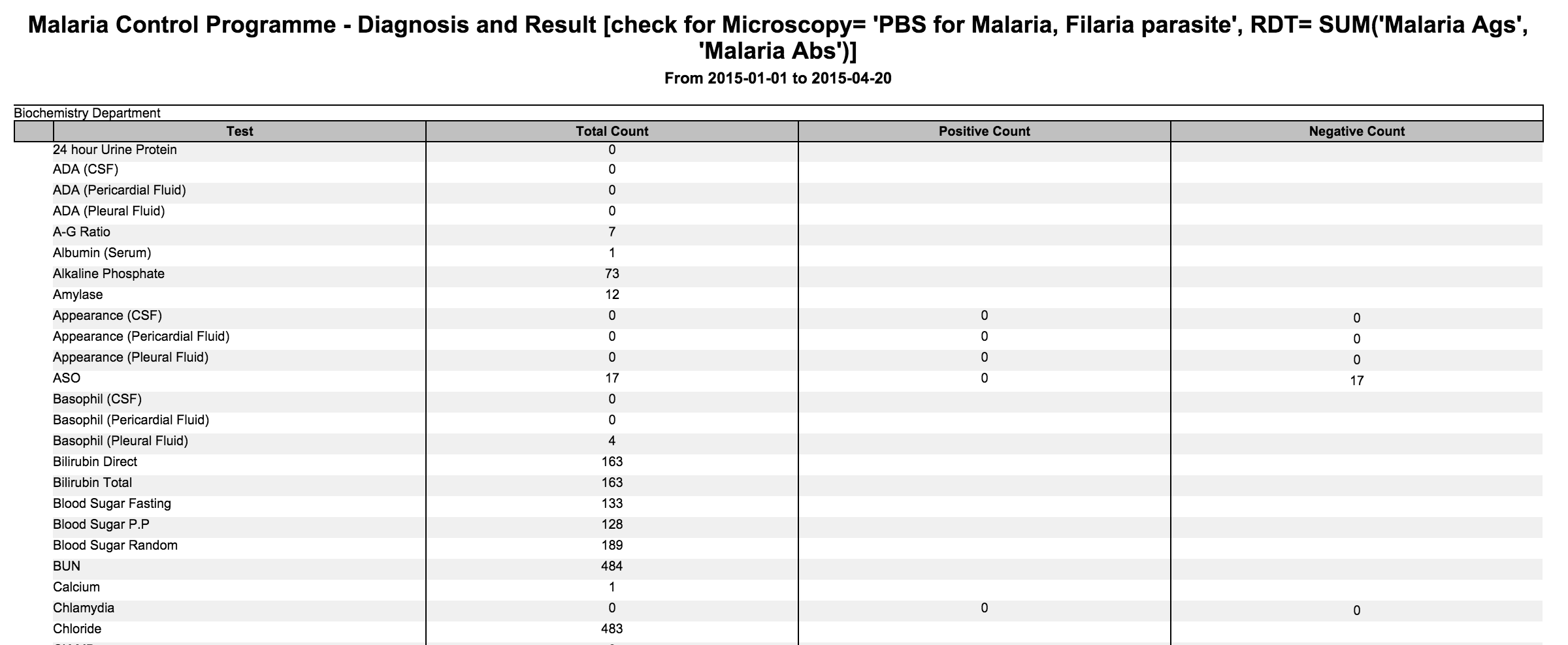
4. Test Count
To list all tests, results and the count.
Configuration
    "name": "Malaria Control Programme - Diagnosis and Result [check for Microscopy= 'PBS for Malaria, Filaria parasite', RDT= SUM('Malaria Ags', 'Malaria Abs')]",
    "type": "TestCount"
Example
6. Observation Template Report
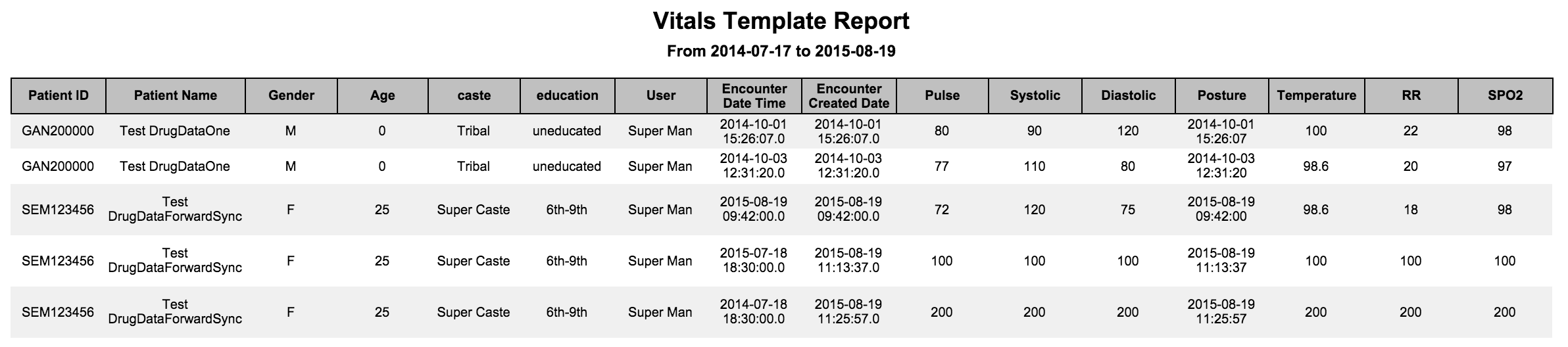
Report for a template with all the fields and the values that were filled in a given timeframe.
Configuration
"vitalsTemplateReport":{
        "name": "Vitals Template Report",
        "type": "obsTemplate",
        "config": {
            "templateName": "Vitals",
            "patientAttributes": ["caste", "education"],
			"locationTagNames": ["Report Location"],
            "applyDateRangeFor": "encounterCreateDate"
        }
    }
name: Name of the Report.
templateName: Observation template for which the report needs to be generated.
patientAttributes: Patient attributes like caste, education to be displayed against each patient in report (Refer to image).
applyDateRangeFor: This additional parameter takes the following value encounterCreateDate or encounterDate, to apply the date range filter accordingly. The default value is encounterDate.
Add the location Tag “Report location” in openmrs
And specify the location tag in config ex. "locationTagNames": ["Report Location” ],
Example
7. OPD/IPD Visits Count Report
Listing the count of new/old OPD/IPD patients counts in a given time period
Configuration
"ipdOPd": { "name": "OPD/IPD Visit Count", "type": "IpdOpdVisitCount"}
Example:

8. Numeric Concept Values Report
Listing the count of numeric concepts observations based on the result values range for the given age groups
Configuration
"HaemoglobinRange": {"name": "Haemoglobin Range Based Report
",
"type":
"NumericConceptValuesCount",
        "config": {
            "rangeGroupName": "Haemoglobin",
            "ageGroupName": "Haemoglobin",
            "conceptNames": ["Haemoglobin"],
            "countOncePerPatient": false
}
}
The default value of "countOncePerPatient" should be false. In this case, we count an observation as many times as it has been recorded.
The observation will be counted once within an encounter. All changes made to an observation within an encounter will be considered as one.
If the value of "countOncePerPatient" is set to true, then we only count the latest value of the observation for the given date range.
Example:

9. Obs Count By Concept Class Report
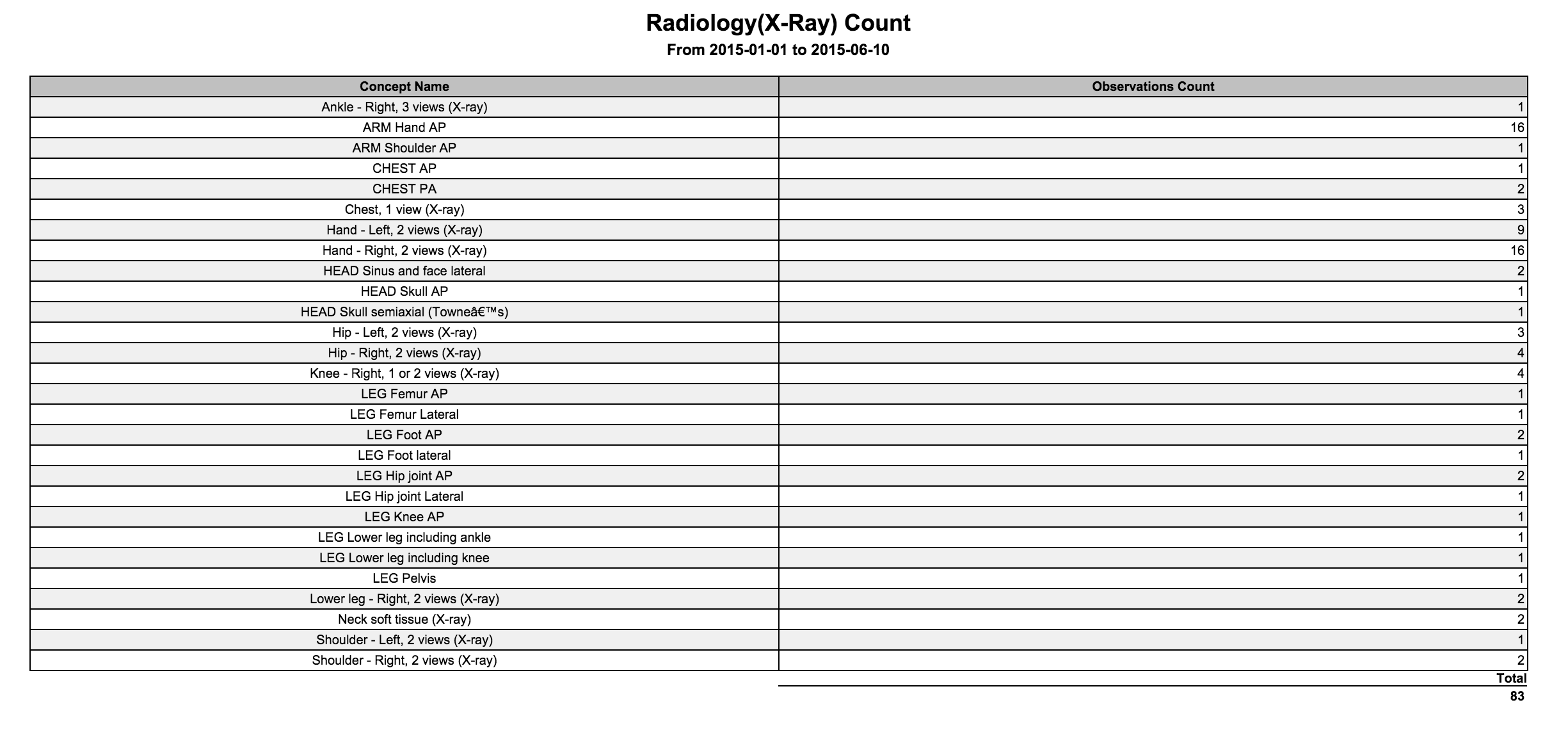
Listing the count of observations based on the concept class for the given date range
Configuration
"radiologyCount": {"name": "Radiology(X-Ray) Count",
"type": "ObsCountByConceptClass",
        "config": {
            "conceptClassNames": ["Radiology"]
        }
}
Example:
10. Obs Value Count Report
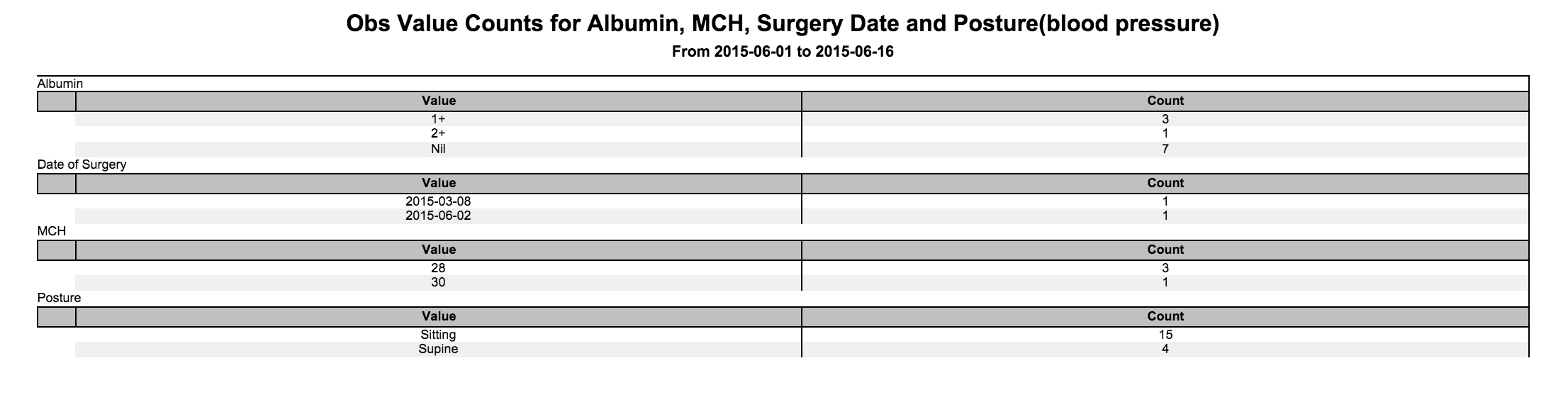
Listing the count of observations for each value for given concept names
Configuration
"ObsValueCount": {"name": "Obs Value Counts for Albumin, MCH, Surgery Date and Posture(blood pressure)",
"type": "ObsValueCount", "config": {
"conceptNames": ["Albumin","MCH","Date of Surgery","Posture"]
} }
Example:
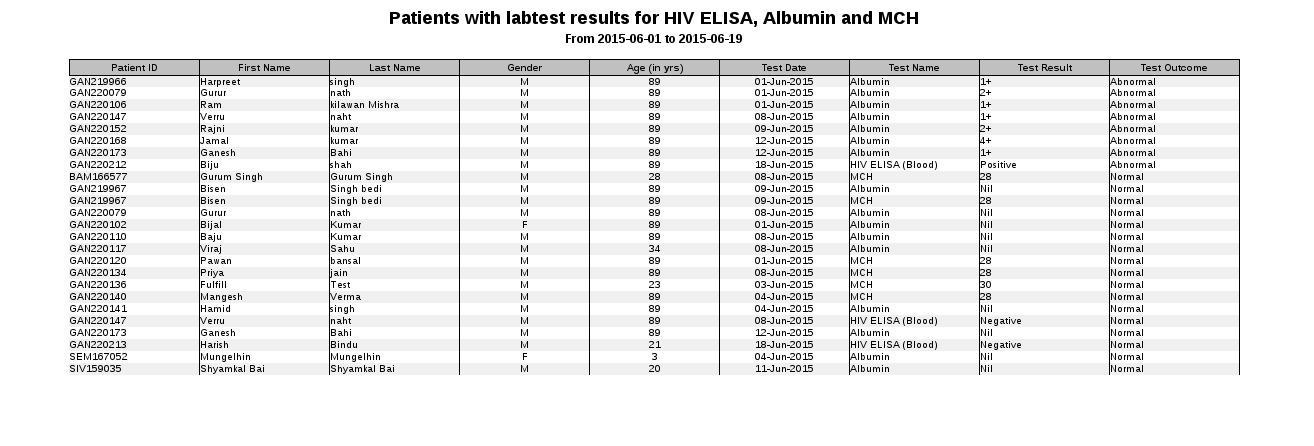
11. Patients With Lab Test Results Report
Listing the patients with lab test results along with test outcome, for a given list of lab tests and based on given test outcome (abnormal and/or normal)
Configuration
"patientsWithLabTest": {"name": "Patients with labtest results for HIV ELISA, Albumin and MCH",
"type": "PatientsWithLabtestResults",
        "config": {
            "conceptNames": ["HIV ELISA (Blood)","Albumin","MCH"]
"testOutcome": ["abnormal","normal"]
}
}
12. IPD Patients Report
In this report, we generate a list of IPD patients along with a number of fields including patient details, confirmed diagnosis (comma separated if there is more than one), observation values (comma separated if there is more than one) for configurable list of concepts, configurablelistof patient attributes and configurable list of address attributes.
Configuration
"ipdPatients": {
   "name": "IPD Patients Report",
   "type": "ipdPatients",
   "config": {
              "addressAttributes": ["address1", "city_village"],
              "patientAttributes": ["caste", "education"],
"conceptNames": ["Height", "Weight"],"locationTagNames": ["Report Location"],
              "filterBy": "Date of Discharge"
    }
}
Note: addressAttributes must be always in snake case Example: "city_village" instead of "cityVillage".
The date range filtering criteria can either be applied on "Date of Admission" or "Date of Discharge". We use "filterBy" parameter to specify the user criteria and distinguish between the two scenarios. If not configured, the "filterBy" parameter will be defaulted to "Date of Admission".
- Add the location Tag “Report location” in openmrs
- And specify the location tag in config ex. "locationTagNames": ["Report Location” ],

13. Visits Aggregate Count Report
In this report, we will generate the count of admission and discharges happened during the given date range, for each visit type.
Configuration
"visitAggregateCount": {
    "name": "Visit Aggregate Count Report",
    "type": "VisitAggregateCount",
    "config": {
"type": "VisitAggregateCountReport","locationTagNames": ["Report Location"],
               "visitTypes": "'IPD','OPD','EMERGENCY'"
    }
}
- Add the location Tag “Report location” in openmrs
- And specify the location tag in config ex. "locationTagNames": ["Report Location” ],

14. Patient Program State Count Report
In this report, we will generate the count of patients who are admitted to different states of a program.
Note: If a program has no states it will open up a blank page. The parameter "programName" is a program which is already configured earlier in OpenMRS.
Configuration
"patientProgram": {
    "name": "Patient Program State Count Report",
    "type": "programStateCount",
    "config": {
               "programName": "Patient Overall Status"
    }
}
Example: We have created a Patient Overall Status program and added three states 'Attending Clinic', 'Transferred OutOf' and 'Dead' to it. It shows the number of patients that have entered a state
within a given date range "From 2015-08-01 to 2015-08-13" .
If the patient is currently enrolled in a different state, still the count should be taken for the original state if it is in the date range and has not been deleted.

15. Patient Program State Transition Count Report
In this report, we will generate the count of patients who are under going a state transition of a program.
Note: If a program has no states it will open up a blank page. The parameter "programName" is a program which is already configured earlier in OpenMRS.
Configuration
"malariaProgram": {
    "name":"Malaria Program State Transition Report",
    "type":"programStateTransitionReport",
    "config":{
        "programName":"Malaria Program"
  }
}
Example: We have created a Malaria Program and added three states 'First State', 'Second State' and 'Third State' to it. It shows the number of patients that have done a state transition
from 'First State' to 'Second State' and from 'Second State' to 'Third State' within a given date range "From 2015-08-02 to 2015-08-06" .

16. Patient Data Report
In this report, patient details are generatedwiththe following fields
- Patient ID
- Patient Name
- Age
- Gender
- DOB
- Address fields
- Patient Attributes
- Date of registration
Note: If no date range is specified then the data for all patients is returned.
Configuration
"patientInformation": {
"name": "Patient Information",
"type": "PatientReport"
}

17. Program Patient State Report
Patient details are generated with the following fields
- Sr. No.
- Patient Identifier
- Patient Name
- Patient Age
- enrolment date in the program
- states for the patient
- state start date
- state end date
- end date of the program for the patient
- outcome for the patient
Configuration
"programPatientStateReport":{
    "name": "Program Patient State Report",
    "type": "PatientProgramReport",
    "config": {
        "programName": "Malaria Program"
 }
},
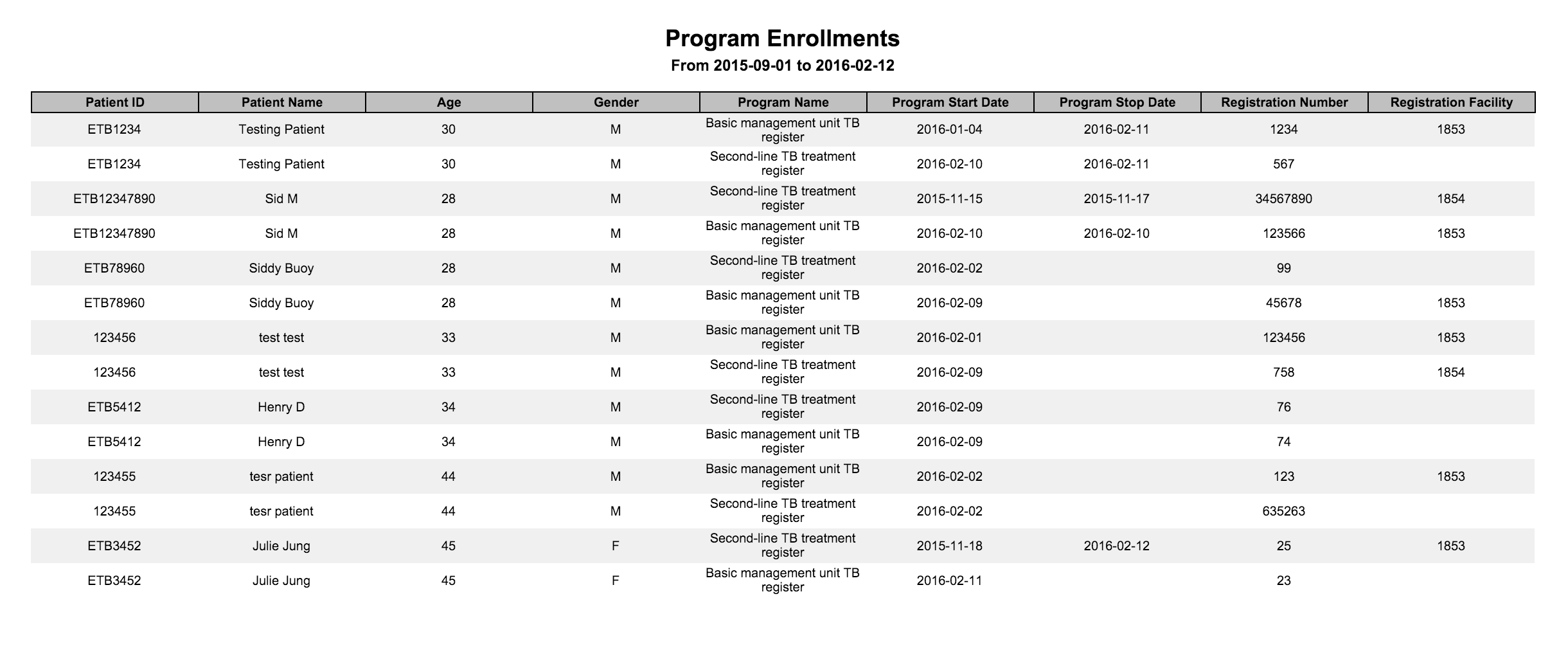
18. Program Enrollments Canned Report
Configurations
"programEnrollmentTemplateReport": {
    "name": "Program Enrollments",
  "type": "ProgramEnrollmentReport"
}
19. Observation Canned Report
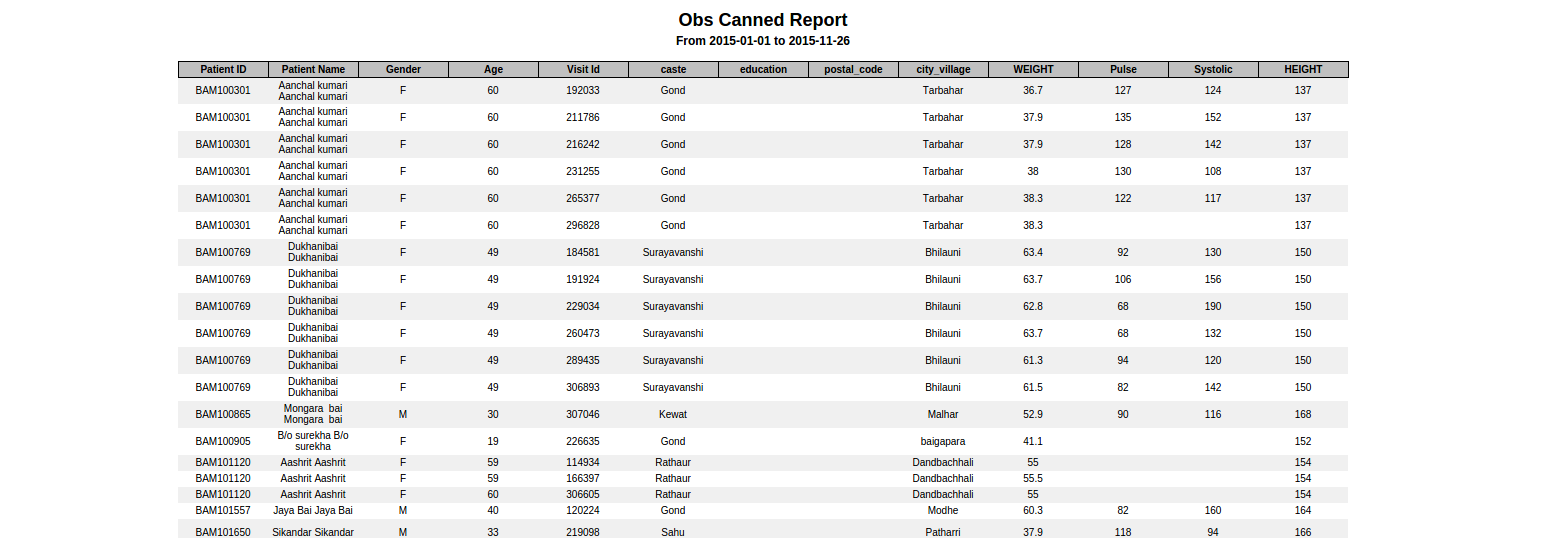
Configurations
"obsCannedReport": {
    "name": "Obs Canned Report",
 "type": "obsCannedReport",
 "config": {
      "patientAttributes": ["caste", "education"],
  "applyDateRangeFor": "ObsRecording",
  "addressAttributes": ["postal_code", "city_village"],
  "conceptNames": ["WEIGHT","Pulse", "Systolic"],
  "visitIndependentConcept": ["HEIGHT"],
  "enrolledProgram" :"HIV Program" ,
  "showObsOnlyForProgramDuration": false
  }
}
Patient Attributes : all the possible values from personattributetype.name column like {"HEIGHT","WEIGHT","Pulse"}. (REQUIRED)
Apply Date Rage For : "<tablename>.<columnname>" of type date(or datetime) where table should be one of [obs,encounter,patientidentifier,patientprogram,program,concept_view] PS patientidentifier & patientprogram are joined only is enrolledProgram is mentioned in config (REQUIRED) Values, ObsRecording,ProgramEnrollment
Addrress Attributes : column names of person_addrress table (REQUIRED)
concept names : only leaf level concept names, concept set are not supported (REQUIRED)
visit independent concepts : latest obs will be picked for them irrespective of visit. PS visits other than visit having latest obs will have no value for this field. (REQUIRED)
enrolled program : only one program name is supported (OPTIONAL : remove entire config if not required)
show obs only for program duration : filter only those obs taken in given program (REQUIRED)
20. Drug Order Reports:
This report will show patients information for whom the drugs are being ordered within the given date range.This report consists of patient information as well as drug information.
Configuration:
"drugOrderReport":{
        "name": "Drug Order report",
        "type":"DrugOrder"
}
21. Program Observation Template Reports
Report for a template with all the fields and the values that were filled in a given timeframe.
Configuration
"vitalsTemplateReport":{
       "name": "Vitals Template Report",
       "type": "programObsTemplate",
       "config": {
           "templateName": "Vitals",
           "patientAttributes": ["caste", "education"],
           "programAttributes":[ "Doctor","Enrollment","Id","Treatment_Date"],
           "programNames": ["Malaria","Tuberculosis"],
		   "addressAttributes":["city", "state_province"]
	}
}
name: Name of the Report.
templateName: Observation template for which the report needs to be generated.
patientAttributes: Patient attributes like caste, education to be displayed against each patient in report (Refer to image).
programAttributes: Program attributes like doctor, treatment date to be displayed against each program in report (Refer to image).
programNames: List of program names for which the observations should be displayed. If not specified it will fetch observations for all programs.
Add the location Tag “Report location” in openmrs
And specify the location tag in config ex. "locationTagNames": ["Report Location” ],
addressAttributes: List of address attributes to be displayed (NOTE: addressAttributes must be always in snake case Example: "city_village" instead of "cityVillage".)
Example

22. Program Specific Drug Order Report
A a new Program Specific Drug Order Report is created which will only consider the active programs within a date range, for drug orders and export all data for the active programs. The programs to be displayed as well as the program attributes are configurable to be displayed.
Please refer to the code snippet below for the available configurations:
 "programDrugOrder": {
        "name": "Program Drug Order Report",
        "type": "ProgramDrugOrder",
        "config": {
                "programs": [
                       "Second-line TB treatment register",
                        "Basic management unit TB register"
                ],
                "patientAttributes": [
                        "PatientCountry",
                        "TelephoneNumber"
                ],
                "programAttributes": [
                          "Registration Number",
                        "Registration Facility"
                     ]
        }
}
Example:

Custom SQL
The client wants the data from the system so that they can analyse various metrics. But there is limitation in canned reports to achieve this. So, Bahmni offers Custom SQL reports where an implementer can specify a SQL to extract the data from the system. But an implementer has to understand the complete OpenMRS data model and it makes difficult for them. So, there is Generic Reports which will eventually hoping to solve the problem.
Configuration
"hospitalActivities": {"name": "Hospital Activities - Number of Clients Served (New and Total)",
"type": "MRSGeneric",
"config": {
"sqlPath": "/var/www/bahmni_config/openmrs/reports/hmis/number_of_clients.sql"
}
}
The MRSGeneric type denotes that the sql query is executed on OpenMRS. The ElisGeneric type denotes that the sql query is executed on OpenELIS. The following are some of the custom reports at one of our implementations. This can be used as reference.
Jasper Reports (Deprecated)
Few of the earlier Bahmni implementations uses this feature. Bahmni gives way to connect to Jasper Report module and an implementer will have to setup Jasper and design the form and SQL using that. Since this is one of the very old way, it is not encouraged to introduce to any site implementations.
Generic Reports
There are difficulties faced in reports module as an implementer or as a developer. If I am an implementer then I must know OpenMRS data model so that I can write Custom SQL to extract the data for analytical purpose. If I am a developer then I have to create a canned report and duplicate the SQL from the similar report and this increases the maintenance. This makes life difficult for the community.
So, Bahmni currently provides generic reports for different entities in OpenMRS. For eg: Observations, Visits and Programs etc. The generic reports allows an implementer to extract data from the system for each entity, hence Bahmni has report for each. Generic reports provides option to include related fields and also provides option to apply various filters.
23. Visits Report
There are at times, we would like to extract visit information in variety of ways so that the extracted information can be analysed for betterment. This feature allows the implementer to configure such a way that he/she canapplyfilter(s) on visit and also can configure specific set of fields to be in the output.
The following fields are default in the output.
Patient Identifier
Patient Name (First Name + Last Name)
Age
- Birthdate
- Gender
- Patient Created Date
- Visit type
- Date started
- Date stopped
- Date Of Admission
- Date Of Discharge
Please refer to the code snippet below for the available configurations:
"nameOfReport":{
    "name": "Report Name",
    "type": "visits",
    "config": {
        "forDataAnalysis": true,
        "patientAttributes": ["caste", "class", "education", "occupation", "primaryContact"],
        "visitAttributes": ["Visit Status", "Admission Status"],
        "patientAddresses": ["address3", "city_village"],
        "applyDateRangeFor": "visitStopDate",
        "visitTypesToFilter": ["PHARMACY VISIT", "OPD"],
		"excludeColumns": ["Patient Name"],
		"additionalPatientIdentifiers": ["National Id"],
		"ageGroupName":"Age group name"
    }
}
| Key | Description | Required | Default |
|---|---|---|---|
| nameOfReport | Unique key to identify the report | Yes | |
| name | Report name to be shown on report | Yes | |
| type | Type of report | Yes | It has to be "visits" |
| config | Is the section to config what you need in the report | No | |
| forDataAnalysis | Is to fetch the patient_id and visit_id in the report | No | False |
| patientAttributes | Is to fetch patient attributes along with the mandatory fields | No | |
| visitAttributes | Is to fetch visit attributes along with the mandatory fields | No | |
| patientAddresses | Is to fetch patient address along with the mandatory fields | No | |
| applyDateRangeFor | Is to configure the field which we have to apply the date range for (visitStopDate|visitStartDate) | No | visitStartDate |
| visitTypesToFilter | Is to filter the visits by its type | No | All visit types |
| excludeColumns | Is to exclude the columns from output. | No | Doesn't exclude any columns. |
additionalPatientIdentifiers | To display additional identifiers in the report | No | Doesn't show additional patient identifiers |
| ageGroupName | Name of the age group to show in report Age group configurations can be inserted into the reference table "reporting_age_group" | No | Doesn't show age group |
Example:

24. Observations Report
There are at times, we would like to extract observation information in variety of ways so that the extracted information can be analyzed for betterment. This feature allows the implementer to configure such a way that he/she can apply filter(s) on observations and also can configure specific set of fields to be in the output.
The following fields are default in the output.
Patient Identifier
Patient Name (First Name + Last Name)
Age
- Birthdate
Gender
Location Name
- Concept Name (If encounterPerRow is false)
- Observation Value (If encounterPerRow is false)
- Observation datetime (If encounterPerRow is false)
- Parent Concept (If encounterPerRow is false)
- Program Enrollment Date
- Program End Date
- Patient Created Date
Please refer to the code snippet below for the available configurations:
"nameOfReport":{
    "name": "Report Name",
    "type": "observations",
    "config": {
        "patientAttributes": ["caste", "class", "education", "occupation", "primaryContact"],
        "patientAddresses": ["address3", "city_village"],
        "visitAttributes": ["Visit Status", "Admission Status"],
        "showVisitInfo": true,
        "showProvider": true,
		"programsToFilter": [],
        "conceptNamesToFilter": [],
        "conceptClassesToFilter": [],
        "locationTagsToFilter": ["Login Location"],
        "applyDateRangeFor": "obsDatetime",
        "encounterPerRow": false,
        "forDataAnalysis": true,
        "visitTypesToFilter": ["PHARMACY VISIT", "OPD"],
		"excludeColumns": ["Patient Name"],
		"additionalPatientIdentifiers": ["National Id"],
		"ignoreEmptyValues": false,
		"conceptNameDisplayFormat": "short",
		"ageGroupName":"Age group name"
    }
}
| Key | Possible Values | Description | Required | Default |
|---|---|---|---|---|
| nameOfReport | Any string | Unique key to identify the report | Yes | |
| name | Any String | Report name to be shown on report | Yes | |
| type | Type of the report | Yes | "It has to be observations" | |
| config | Is the section to configure what you need in the report | No | ||
| patientAttributes | Any patient attribute types | Is to fetch patient attributes along with the mandatory fields | No | |
| patientAddresses | Any patient address fields | Is to fetch patient address along with the mandatory fields | No | |
| visitAttributes | Any visit attribute types | Is to fetch visit attributes along with the mandatory fields | No | |
| showVisitInfo | true / false | Is to fetch visit information along with the mandatory fields. It fetches visit type, visit start date, visit stop date. | No | False |
| showProvider | true / false | Is to fetch provider of individual observation. NOTE: Since there will be different observation with different provider, Report doesn't show provider name if encounterPerRow is true. | No | False |
| conceptNamesToFilter | Any FULLY_SPECIFIED concept name |
| Yes/No |
|
| conceptClassesToFilter | Any concept class |
| Yes/No |
|
| locationTagsToFilter | Any location tag | Is to filter observations by locations. | No | All location's data. |
| applyDateRangeFor | visitStopDate / visitStartDate / programDatetime/ obsDatetime | Is to configure the field which we have to apply the date range for. | No | obsDatetime |
| encounterPerRow | true / false | Is to fetch one encounter per row. ConceptName will be column and value will be row. If you capture a concept multiple times in an encounter it will show comma separated. | No | False |
forDataAnalysis | true / false | Is to fetch database id's like patient_id, concept_id, observation_id etc.. for analysis purpose. | No | False |
| programsToFilter | any program name | is to filter observations by programs | No | |
| visitTypesToFilter | any visit type | Is to filter the visits by its type | No | All visit types |
| excludeColumns | any column names | Is to exclude the columns from output. | No | Doesn't exclude any columns. |
additionalPatientIdentifiers | Any additional patient identifier types | To display additional identifiers in the report | No | Doesn't display additional patient identifiers |
| ignoreEmptyValues | true/false | To ignore rows with empty observation value.This config is not applicable when encounterPerRow is true | No | False |
conceptNameDisplayFormat | short / fully_specified | Display format of concept name on the report. NOTE: This option is currently only available for generic observation report | No | fully_specified(short) |
| ageGroupName | Any age group name | Name of the age group to show in report | No | doesn't show age group |
Example:
Example for report of one observation per row.
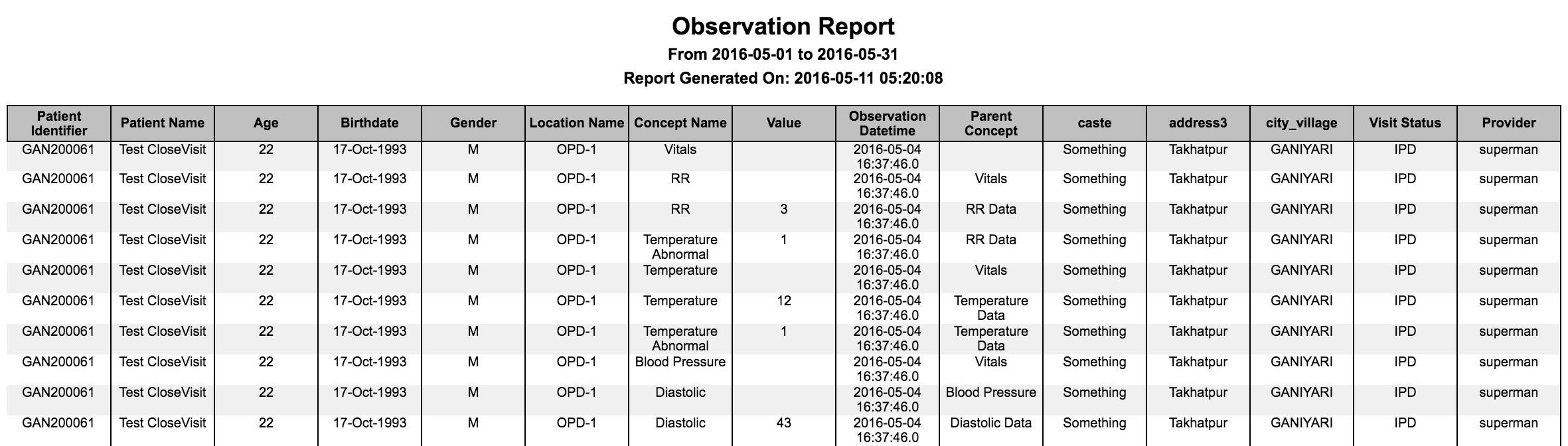
Example for report of one encounter per row.

Example for report with all the default fields.

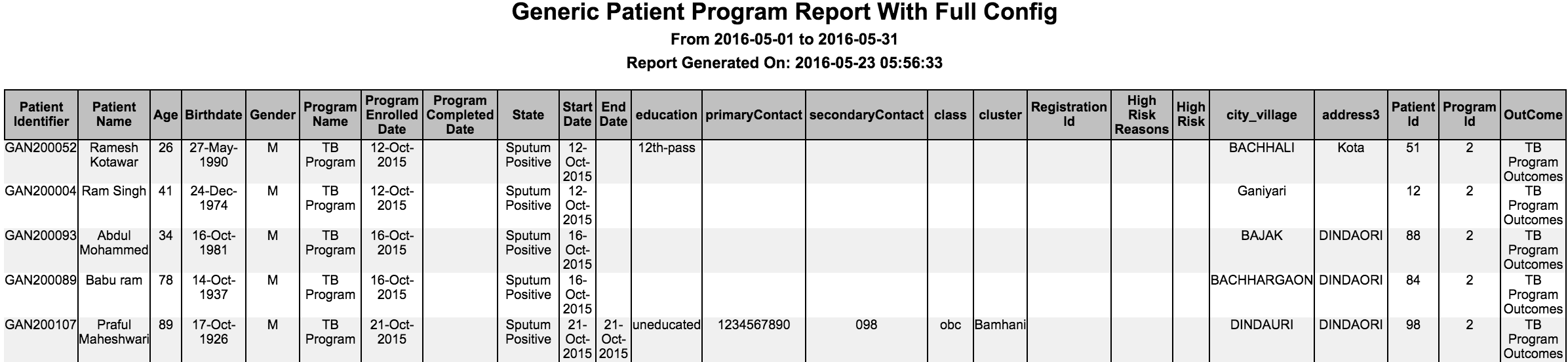
25. Programs Report
There are at times, we would like to extract programinformation in variety of ways so that the extracted information can be analyzed for betterment. This feature allows the implementer to configure such a way that he/she can apply filter(s) on programs and also can configure specific set of fields to be in the output.
The following fields are default in the output.
Patient Identifier
Patient Name (First Name + Last Name)
Age
- Birthdate
Gender
- Patient Created Date
- Program Name
- Date Enrolled
- Date Completed
- Current State
Please refer to the code snippet below for the available configurations:
 "nameOfReport":{
    "name": "Report Name",
    "type": "programs",
    "config": {
        "patientAttributes": ["caste", "class", "education", "occupation", "primaryContact"],
        "patientAddresses": ["address3", "city_village"],
        "programAttributes": ["Visit Status", "Admission Status"],
        "programNamesToFilter": [],
		"showAllStates": true,
        "forDataAnalysis": true,
		"excludeColumns": ["Patient Name"],
		"additionalPatientIdentifiers": ["National Id"],
		"ageGroupName":"Age group name"
    }
}
| Key | Possible Values | Description | Required | Default |
|---|---|---|---|---|
| nameOfReport | Any string | Unique key to identify the report | Yes | |
| name | Any String | Report name to be shown on report | Yes | |
| type | "programs" | Type of the report | Yes | "It has to be programs" |
| config | Is the section to configure what you need in the report | No | ||
| patientAttributes | Any patient attribute types | Isto fetch patient attributes along with the mandatory fields | No | None |
| patientAddresses | Any patient address fields | Is to fetch patient address along with the mandatory fields | No | None |
| programAttributes | Any program attribute types | Is to fetch program attributes along with the mandatory fields | No | None |
| programNamesToFilter | Array of program names | Is to filter by programs | No | All programs |
forDataAnalysis | true / false | Is to fetch database id's like patient_id, program_id etc.. for analysis purpose. | No | False |
| showAllStates | true / false | Is to show all the states of the program | No | False |
| excludeColumns | Any column | Is to exclude the columns from output. | No | Doesn't exclude any columns. |
additionalPatientIdentifiers | Any additional patient identifier type | To display additional identifiers in the report | No | Doesn't display any additional patient identifier |
| ageGroupName | Any age group name | Name of the age group to show in report | No | doesn't show age group |
Example:-
26. Aggregation on generic reports
We have entity based generic reports, for eg: observations report, to extract data from observations into excel and can apply macros to get some statistics. But this report gives the flexibility by providing pivot information in the configuration instead of writing macros will produce the required output.
Please refer to the code snippet below for the sample configurations:
{
   "nameOfReport": {
       "name": "Blood Pressure",
       "type": "aggregation",
       "config": {
           "report":{
               "type": "observations",
               "config": {
                   "conceptNamesToFilter":["Diastolic Data", "Systolic Data"],
                   "showVisitInfo" : true,
                   "forDataAnalysis": true,
                   "visitAttributes": ["Visit Status", "Admission Status"],
                    "visitTypesToFilter": ["IPD"]
               }
           },
           "rowGroups": [
               "Gender"
           ],
           "columnGroups": [
               "Concept Name", "value"
           ],
           "distinctGroups": [
               "Patient Identifier"
           ],
			"showTotalRow":true,
			"showTotalColumn":true
       }
   }
}
| Key | Possible Values | Description | Required | Default |
|---|---|---|---|---|
| nameOfReport | Any string | Unique key to identify the report | Yes | |
| name | Any String | Report name to be shown on report | Yes | |
| type | "aggregation" | Type of the report | Yes | "It has to be aggregation" |
| config | Is the section to configure what you need in the report | Yes | ||
| report | Any existing generic reports(Ex: observations) | Is to apply aggregation on that particular report. The config under report option refers to generic report config. If it is observations then config values from observations report will be used here. | Yes | None |
| rowGroups | Any column name in the report on which we are doing aggregation | Is to include columns to group for rows | Yes | None |
| columnGroups | Any column name in the report on which we are doing aggregation | Is to include columns to group for columns | No | None |
distinctGroups | Any column name in the report on which we are doing aggregation | Is to do distinct count on given column after grouping rows and columns | Yes | None |
| showTotalRow | true / false | Shows the Total row at the bottom of table | No | false |
| showTotalColumn | true / false | Show the Total Column as last column of table | No | false |
Example:
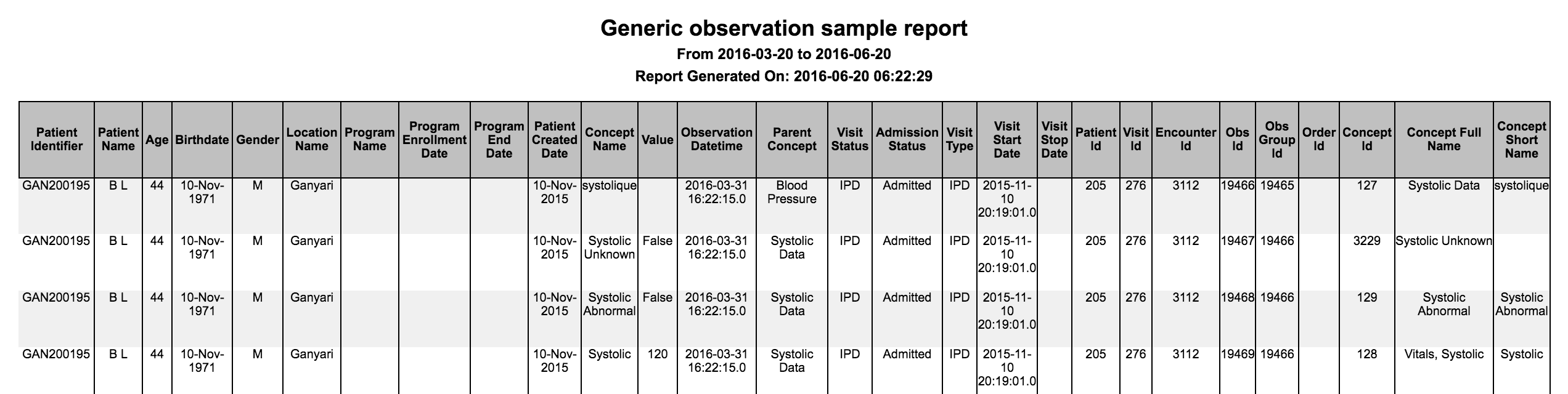
If an user wants to generate aggregation for the above observations and based on sample config shown above will produce the following output. This reports shows the number of males and females based on their diastolic and systolic values as we defined rowGroups as Gender and columnGroups as Concept Name and Value. The count is based on Patient Identifier which is specified in distinct Group.

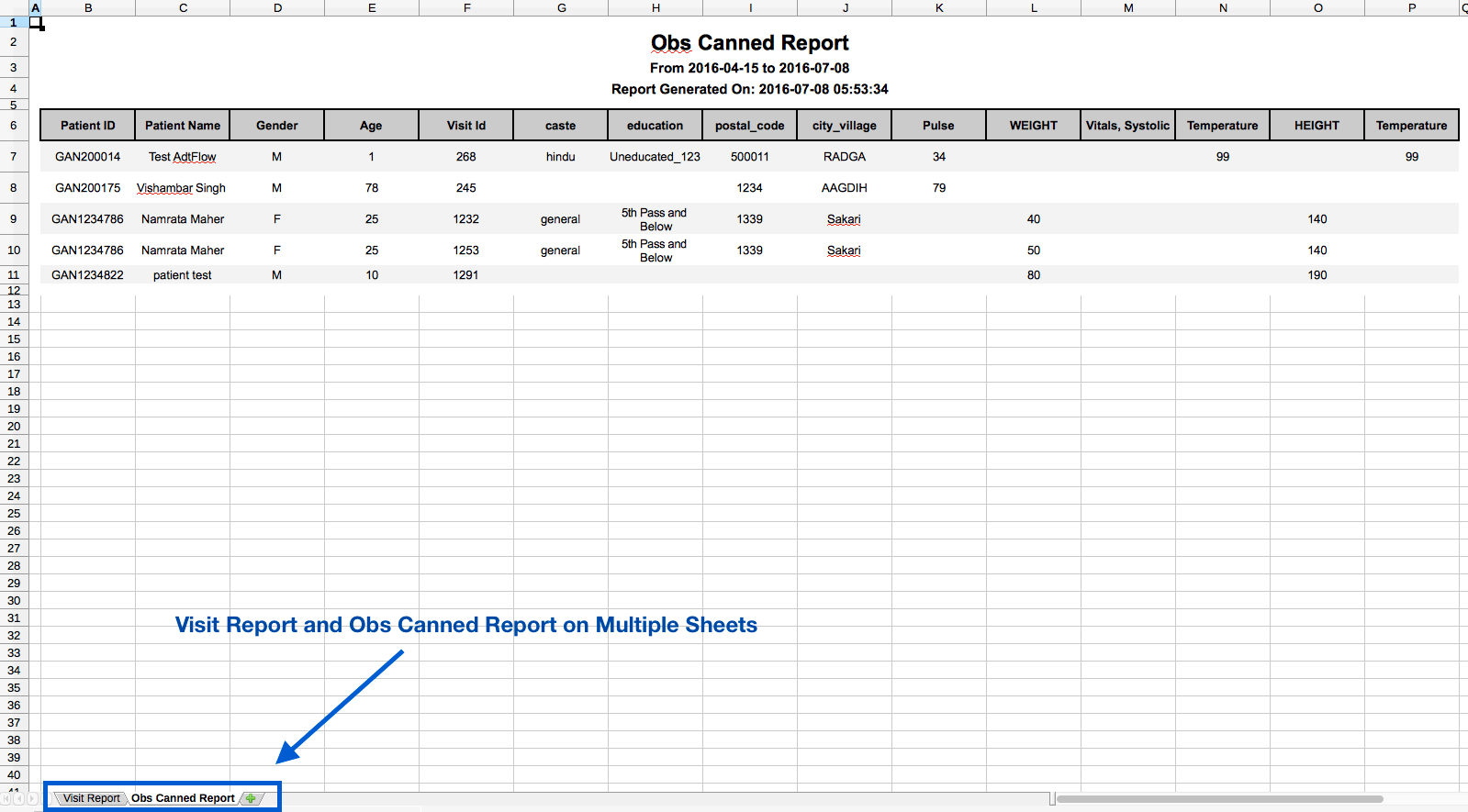
27. Concatenating Multiple Reports
There is an ability to concatenate multiple reports. Concatenated reports does not support CSV format.
Please refer to the code snippet below for the sample configurations:
"visitAndObsCannedReport": {
    "name": "Visit and Observation Report",
    "type": "concatenated",
    "config": {
        "reports": [
            {
                "name": "Visit Report",
                "type": "visits",
                "config": {
                    "forDataAnalysis": true,
                    "patientAttributes": [
                        "caste",
                        "class",
                        "education",
                        "occupation",
                        "primaryContact"
                    ],
                    "visitAttributes": [
                        "Visit Status",
                        "Admission Status"
                    ],
                    "patientAddresses": [
                        "address3",
                        "city_village"
                    ],
                    "applyDateRangeFor": "visitStopDate",
                    "visitTypesToFilter": [
                        "PHARMACY VISIT",
                        "OPD"
                    ]
                }
            },
            {
                "name": "Obs Canned Report",
                "type": "obsCannedReport",
                "config": {
                    "patientAttributes": [
                        "caste",
                        "education"
                    ],
                    "applyDateRangeFor": "ObsRecording",
                    "addressAttributes": [
                        "postal_code",
                        "city_village"
                    ],
                    "conceptNames": [
                        "Pulse",
                        "WEIGHT",
                        "Vitals, Systolic",
                        "Temperature"
                    ],
                    "visitIndependentConcept": [
                        "HEIGHT",
                        "Temperature"
                    ],
                    "enrolledProgram": "HIV Program",
                    "showObsOnlyForProgramDuration": false
                }
            }
        ]
    }
}
| Key | Possible Values | Description | Required | Default |
|---|---|---|---|---|
| nameOfReport | Any string | Unique key to identify the report | Yes | |
| name | Any String | Report name to be shown on report | Yes | |
| type | "concatenated" | Type of the report | Yes | "It has to be concatenated" |
| config | Is the section to configure all the reports that you want in one report file. Please refer to the individual report description above for configuring them | Yes |
Example:
If user wants to generate a concatenated report of Visit Report and Obs Canned Report, he will be able to view it each report on different sheet of excel. For other formats like PDF, HTML, etc., reports will be one below the other.
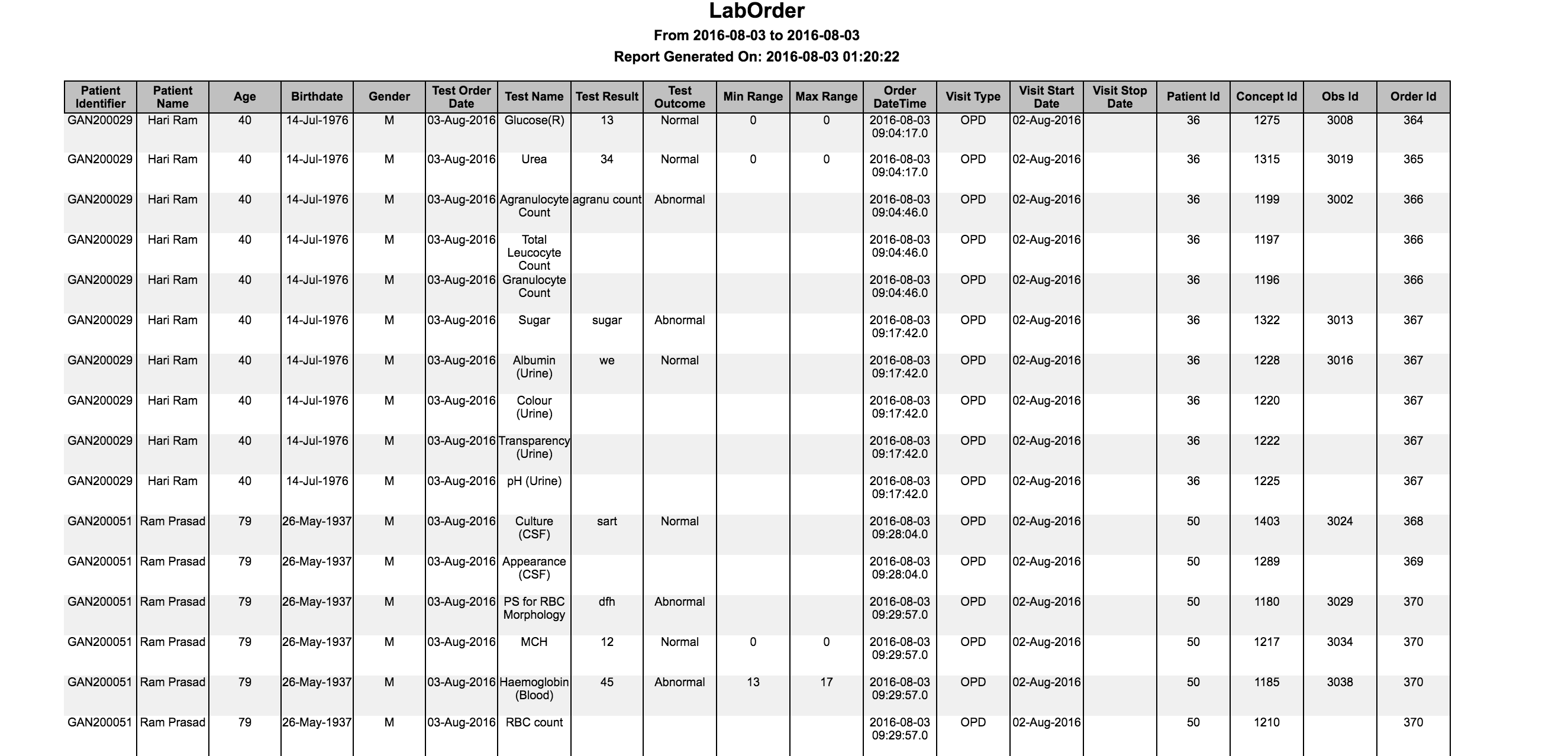
28. Lab results Report
There are at times, we would like to extract lab results information in variety of ways so that the extracted information can be analyzed for betterment. This feature allows the implementer to configure such a way that he/she can apply filter(s) on lab results and also can configure specific set of fields to be in the output.
The following fields are default in the output..
Patient Identifier
Patient Name (First Name + Last Name)
Age
- Birthdate
Gender
- Test Order Date
- Test Name
- Test Result
- Test Outcome
- Test Result Min range
- Test Result Max range
Please refer to the code snippet below for the available configurations:
"nameOfReport":{
    "name": "Report Name",
    "type": "labOrders",
    "config": {
        "patientAttributes": ["caste", "class", "education", "occupation", "primaryContact"],
        "patientAddresses": ["address3", "city_village"],
        "visitAttributes": ["Visit Status", "Admission Status"],
        "showVisitInfo": true,
        "showProvider": true,
		"programsToFilter": [],
        "conceptNamesToFilter": [],
        "conceptValuesToFilter": [],
        "forDataAnalysis": true,
		"excludeColumns": ["Patient Name"],
		"showOrderDateTime": true,
		"additionalPatientIdentifiers": ["National Id"],
		"ageGroupName":"Age group name"
    }
}
| Key | Possible Values | Description | Required | Default |
|---|---|---|---|---|
| nameOfReport | Any string | Unique key to identify the report | Yes | |
| name | Any String | Report name to be shown on report | Yes | |
| type | Type of the report | Yes | "It has to be labOrders" | |
| config | Is the section to configure what you need in the report | No | ||
| patientAttributes | Any patient attribute types | Is to fetch patient attributes along with the mandatory fields | No | |
| patientAddresses | Any patient address fields | Is to fetch patient address along with the mandatory fields | No | |
| visitAttributes | Any visit attribute types | Is to fetch visit attributes along with the mandatory fields | No | |
| showVisitInfo | true / false | Is to fetch visit information along with the mandatory fields. It fetches visit type, visit start date, visit stop date. | No | False |
| showProvider | true / false | Is to fetch provider of individual lab result. | No | False |
| conceptNamesToFilter | Any FULLY_SPECIFIED concept name of a lab test | Is to filter lab results by any test name. The name you specify should be FULLY_SPECIFIED concept name | No | Default will be all lab results within date range the report is run on |
| conceptValuesToFilter | Any test result value or numeric ranges | Is to filter lab results by any test result value or numeric ranges. Format for numeric ranges :
| No | |
forDataAnalysis | true / false | Is to fetch database id's like patient_id, concept_id, observation_id etc.. for analysis purpose. | No | False |
| programsToFilter | any program name | is to filter lab results by programs | No | |
| excludeColumns | any column names in the report | Is to exclude the columns from output | No | Doesn't exclude any columns. |
showOrderDateTime | true / false | Show full order creation date time in the database | No | False |
additionalPatientIdentifiers | Any additional patient identifier type | To display additional identifiers in the report | No | Doesn't dispaly any additional patient identifier |
| ageGroupName | Any age group name | Name of the age group to show in report | No | doesn't show age group |
Example:
Embed the Report generated in an existing workbook template with macros
Bahmni allows one to embed the data exported by the report in an existing workbook template which can contains formulae to create pivot table on the generated data. Workbook template has to be in .xls format.
The reports can be generated from the screen Home > Reports. To generate the report with formula from the workbook template applied on data, select format as 'CUSTOM EXCEL' and upload the required excel formula template and click on 'Run Report'. A report would be generated with actual data on sheet named 'Report' and data generated by formula in the template in 'Sheet1'. Please refer below to configure the Macro file to avoid uploading it every time for a report.
A excel template can be found here which contains a macro. Formulae has to be added in 'Sheet1' of the above excel template and can be uploaded to generate a report. On opening the generated excel report,
macro that is present in the above excel template would apply the formula over the actual data. So 'Enable macros' should be selected on opening the generated excel report.
Example Formula:
=SUM(Report!G9, Report!G10) - 'Report' sheet is the sheet which would contain the raw data without applying the formulae.
Note: If formula is added to any other template and used for generation of report, it wont work. Please use only the above template linked.
Configure the macroTemplate xls file in bahmni_config to avoid every time uploading file while generating report
Steps to Configure :
- Copy the xls(Microsoft 1997-2000) file with macro formula to bahmni_config
Configure the xls file path in bahmni_config as below in report.json
"diabetes":{
        "name": "Diabetes",
        "type": "obsCount",
        "config": {
            "ageGroupName": "All Ages",
            "conceptNames": ["Diabetes, Intake"],
            "visitTypes": ["OPD","IPD"],
            "macroTemplatePath" : "/var/www/bahmni_config/openmrs/apps/reports/macroTemplates/Diabetes.xls"
        }
    },
The Bahmni documentation is licensed under Creative Commons Attribution-ShareAlike 4.0 International (CC BY-SA 4.0)