Form Conditions / Form Events
- Shashikanth Gadgay (Deactivated)
Purpose and Benefits
Form conditions allows users to enable/disable, Show/Hide and change values of observation fields on specific conditions or inputs on the form. Some sections of the form are only filled when a particular set of information is needed. So, if we disable such fields, it simplifies the form. Implementers have to define the form conditions by writing small scripts in JS based on their requirement.
Form conditions can be written for
- On Form Initialization / Load (Form Event)
- To add conditions on form load, click on the Form Event icon shown below
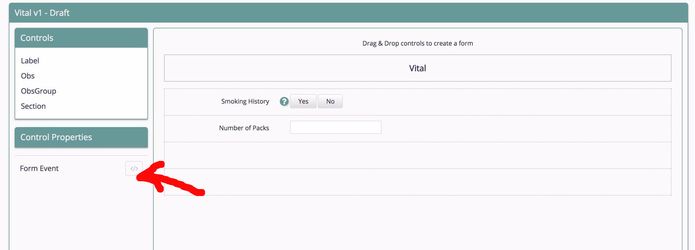
b. Write the conditions in editor window and save
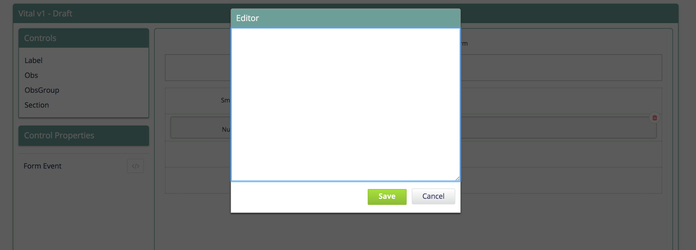
Sample Form Event:
- This example hides the 'Number of Packs' control on load of form if 'Smoking History' value is not set.
function(form) {
	if (form.get('Smoking History').getValue() === undefined) {
		form.get('Number of Packs').setHidden(true);
	} else {
		form.get('Number of Packs').setHidden(false);
	}
}
2. On Change of Values (Control Event)
a. To show/hide, enable/disable or change values of controls, then click on Control Event and write the conditions in editor window and save.
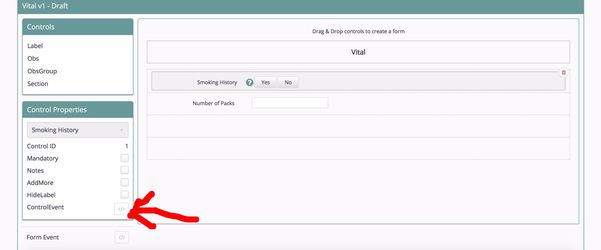
Sample Control Event:
function(form) {
	if (form.get('Smoking History').getValue() === 'No') {
		form.get('Number of Packs').setValue(0);
	}
}
APIs
Following APIs are exposed on the form Object to get a particular control
| API | Description |
|---|---|
| get(conceptName) | Get a control object using concept name. |
| get(conceptName, position) | Get a control object using conceptname and position. Position is used only when there are multiple concepts in the same form |
| getById(ControlID) | Get a control object using control ID |
| getPatient() | Get a patient object |
Following APIs are exposed on the control object
| API | Description |
|---|---|
| getValue() | Returns value of a particular control |
| setValue(value) | Set a value to a particular control |
| getHidden() | Returns whether the control is hidden or not |
| setHidden(hidden) | Hide/Show a particular control |
| getEnabled() | Returns whether the control is enabled or not |
| setEnabled(enabled) | Enable/Disabled a particular control |
The Bahmni documentation is licensed under Creative Commons Attribution-ShareAlike 4.0 International (CC BY-SA 4.0)