Configuring Data Quality Dashboard
- Sruti Sridhar
- Gurpreet Luthra
- Alagesan Palani
Purpose
This feature helps ensure data quality on chosen variables. Based on the rules defined for those variables, a run for the patients yields a list of patients for whom the data is incomplete/erroneous. The results are displayed as a list of all data inconsistencies on a dashboard called the Data Quality Dashboard.
The rules can be customized by an implementer (Steps for the same will be updated later). These rules can be sometimes very complex and therefore the rules can be written in java/sql/groovy depending on the complexity.
This feature is influenced from the OpenMRS data integrity module (https://wiki.openmrs.org/display/docs/Data+Integrity+Module) and slightly modified to suit requirements.
Configure the Data Quality Dashboard:
1. Run Background job
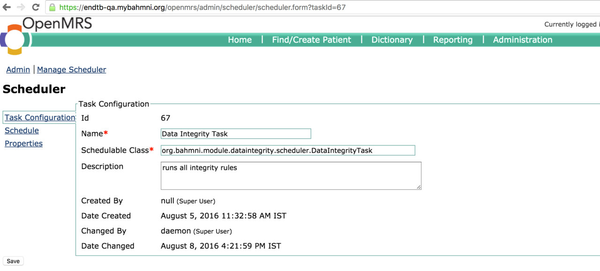
The data integrity task is scheduled to run every day at 12:00AM by default. To change this setting, go to OpenMRS Administration > Manage Scheduler > click on Data Integrity Task link > Schedule and change the repeat interval .
2. Internationalize Data integrity module name
Add the value for key in respective home/ locale_${en,fr, .. }.json.
{
   "MODULE_LABEL_DATA_INTEGRITY_KEY": "Data integrity"
}
3. Internationalize Column Headers
In clinical/locale_en.json,
{
    "MODULE_LABEL_ERROR_REPORTS_KEY": "Error Reports",
    "DQ_PRINT_TITLE_DATA_QUALITY_REPORT": "Data Quality Report",
    "DQ_DASHBOARD": "Data Quality Dashboard",
    "DQ_COLUMN_TITLE_TREATMENT_REG_NO": "Treatment Reg No",
    "DQ_COLUMN_TITLE_NAME": "Name",
    "DQ_COLUMN_TITLE_EMR_ID": "EMR ID",
    "DQ_COLUMN_TITLE_NOTES": "Notes",
    "DQ_COLUMN_TITLE_ACTION": "Action",
    "DQ_COLUMN_TITLE_RULE_NAME":"Rule Name",
    "DQ_COLUMN_TITLE_REG_FACILITY":"Treatment facility"
}
Change of name key
The key for name is changed from "name" to "DQ_COLUMN_TITLE_NAME" and column "DQ_COLUMN_TITLE_REG_FACILITY" is added from 1.4 release
4. Configure Print Button and HTML location
Add the config below to extension-dataintegrity.json
{
  "bahmni_clinical_patients_search_allpatients_app_clinical": {
    "id": "bahmni.clinical.patients.search.allPatients",
    "extensionPointId": "org.bahmni.patient.search",
    "type": "config",
    "extensionParams": {
      "searchHandler": "endtb.sqlSearch.dataIntegrity",
      "forwardUrl": "#/default/patient/{{patientUuid}}/dashboard?programUuid={{programUuid}}&enrollment={{enrollment}}",
      "translationKey": "MODULE_LABEL_ERROR_REPORTS_KEY",
      "view" : "tabular",
      "showPrint": true,
      "printHtmlLocation": "/bahmni_config/openmrs/apps/dataintegrity/patientListPrint.html",
	  "searchColumns" : ["DQ_COLUMN_TITLE_TREATMENT_REG_NO", "DQ_COLUMN_TITLE_NAME"]
    },
    "order": 1,
    "requiredPrivilege": "app:clinical"
  }
}
5. Hide Print Button
To hide print button on the DQ Dashboard set
"showPrint": false
6. Configure Searchable Columns
To configure columns to search on the DQ Dashboard, add the column keys to the list in searchColumns. The search facility can be enabled on all columns.
The configuration below will enable search on columns Treatment Reg No, Name of the patient.
"searchColumns" : ["DQ_COLUMN_TITLE_TREATMENT_REG_NO", "DQ_COLUMN_TITLE_NAME"]
Implementation of DQRules
- The list of rules that are executed can be found in the table dataintegrity_rule in openMRS database.
DQ Rules for EndTB are written in the the openmrs-module-bahmniendtb repository.
Writing new custom rules
- To write custom rules, clone the repository
git clone https://github.com/Bahmni/openmrs-module-bahmniendtb
2. Follow these steps to add a new DQ Rule :
- The rules written in Java can be found in this folder in the repository : openmrs-modulebahmniendtb/api/src/main/java/org/openmrs/module/bahmniendtb/dataintegrity/rules
- Every rule is written as a Java class that implements RuleDefn<PatientProgram> interface.
- The logic for the rule is written in the evaluate method.
- The rule can be inserted into the dataintegrity_rule table as below :
INSERT INTO dataintegrity_rule ( rule_name, rule_category, handler_config, handler_classname, uuid ) VALUES ( "Baseline Firstling DST missing", "java", "java", "org.openmrs.module.bahmniendtb.dataintegrity.rules.RuleName", uuid());
Deploy the latest DQ Rule for local testing
- Run the below command on openmrs-module-bahmniendtb directory
mvn clean install
- The OMOD is generated in this location : openmrs-module-bahmniendtb/omod/target/bahmniendtb-1.4-SNAPSHOT.omod
- Replace the old OMOD with the one generated as above in /opt/openmrs/modules folder in vagrant box
- Restart openMRS service
sudo service openmrs restart
Sample DQ Rules
The following are some sample DQ Rules
Next Steps
Open discussion with community
Support for rule_group and schedule tables so that certain rules can be grouped and can be assigned specific groups to a different schedules. (open for discussion)
Building ability to run rules per patient and making rule groups.
Related content
The Bahmni documentation is licensed under Creative Commons Attribution-ShareAlike 4.0 International (CC BY-SA 4.0)